
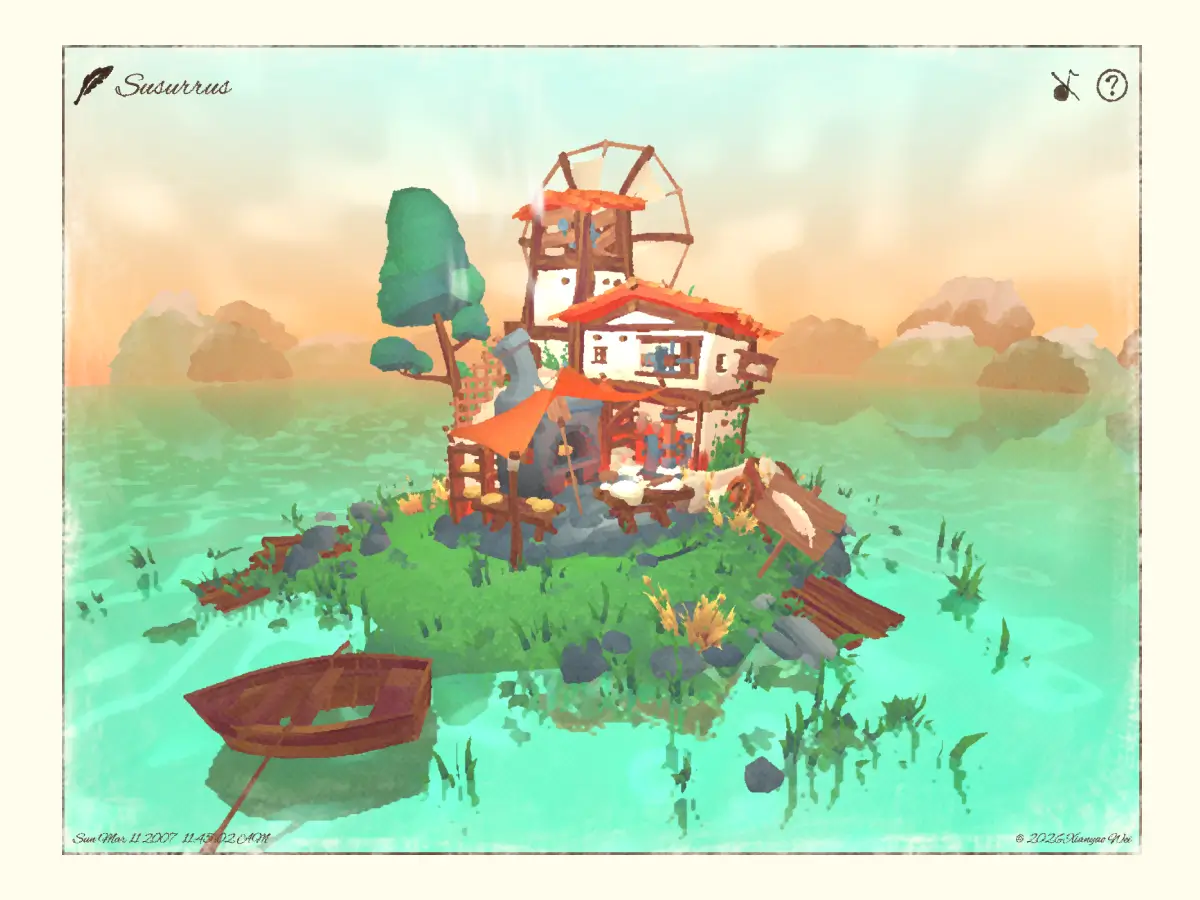
What would it look like if a Three.js/WebGL 3D web experience behaved like a watercolor painting—fluid, responsive, and interactive? In Susurrus, I explore this idea using Non-Photorealistic Rendering (NPR), approaching stylization as both an aesthetic and a performance consideration. In this case study, I’ll walk through how this project was designed and built.
Concept: Comfort That Doesn’t Exist
A forgotten windmill floats on the water, rendered with the delicacy of a watercolor painting yet fully 3D and interactive. In Susurrus, the scene feels natural and cozy at first glance, but subtly surreal and absurd upon closer inspection. Soft sound design and a calm atmosphere create a meditative, lo-fi–like space.
Beneath the cozy visuals, a subtle uncanny emerges: a submerged millhouse endlessly producing bread, even though the grain should be long gone—a quiet symbol of non-existent comfort.
Designing Painting-like Visuals
As always, I rarely use Figma or other design tools for personal projects. I prefer a freestyle approach, exploring ideas from a brief concept. The design process feels like an echo in my mind: I want to have a house floating on reflective water, with the Kuwahara shader applied as post-processing to create a painting-like 3D web experience.
The UI/UX is intuitive and clear, focusing on 3D content. Two poets are featured, but the core message is emotion and atmosphere—expressed through visuals and sound. Just like the name Susurrus, the words are subtle and unclear, more about conveying a vibe than literal meaning.
Tech Stack
- React
- React Three Fiber
- Drei
- React Three Rapier
- Howler.js
- TypeScript
- WebGL
- HTML / SCSS
Kuwahara Shader: Defining the Project’s Identity
The entire visual style of Susurrus is based on the Kuwahara shader. Although it may look heavily processed, the Kuwahara shader is actually the only post-processing pass in the project, and everything is built around it. Some settings and custom shaders are used to subtly “cheat” the eye and achieve the final effect.
In this project I started with it as the first step—even before finishing the 3D models in Blender. This approach allowed me to adjust visual effects early and avoid unexpected shader results later.
I researched different approaches to implementing the Kuwahara shader and found several helpful resources online. The reference that most inspired me was a blog by Maxime Heckel, where he clearly explains the Kuwahara filter and explores painterly shading techniques.
Based on these references, I developed my own simplified implementation during the project, focusing on a more lightweight and limited approach:
- I didn’t use
TensorPassto keep the pass simple, even though it can enhance detail. - I use a different vertex-stage approach compared to standard Kuwahara shader implementations.
varying vec2 vUv;

  void main() {
    vUv = uv;
    vec4 modelViewPosition = modelViewMatrix * vec4(position, 1.0);


    // Set the final position of the vertex
    gl_Position = projectionMatrix * modelViewPosition;
  }
And the vertex code of my Kuwahara shader is:
varying vec2 vUv;

void main() {
  vUv = uv;
  gl_Position = vec4(position, 1.0);
I didn’t use the full modelViewProjection (MVP) matrices to keep calculations slightly faster, with the trade-off that the effect is weaker when the camera gets very close—but since the camera isn’t animated to approach the models, this works okay.
Hier is my version of Kawahara Pass which I used in Susurrus:
The Reflective Water
The reflective water is actually made in a dirty way, it’s just three steps:
- 1. Used
MeshReflectorMaterial, with the watercolor-like style, the resolution can be very low, keeping performance smooth on both mobile and desktop. - 2. Created a custom shader and applied it to a plane above the
MeshReflectorMaterialplane, adding more detail and animation to the water. - 3. Adjusted lightning so the water looks more lively, not too flat or boring.

Spawning Bread on Click
he concept is about building a dynamic painting, so I thought it would be interesting to implement the physics in this project. The Spawning Bread is featured as the main interactive element of Susurrus.
Reveal Effect for the Intro
Regarding performance, I used ScrollControls to control the reveal shader uProgress and applied the shader to a ScreenQuad, which is a very handy way to implement the intro reveal effect.
const RevealOverlay = ({ visible = true }: { visible?: boolean }) => {
  const materialRef = useRef(null!);
  const meshRef = useRef(null!);
  const scroll = useScroll();

  const uniforms = useMemo(
    () => ({
      uProgress: { value: 0 },
    }),
    [],
  );

  useEffect(() => {
    if (meshRef.current) {
      meshRef.current.raycast = () => null;
    }
  }, []);

  useFrame(() => {
    if (!materialRef.current) return;

    let offset = scroll.offset;
    if (offset < 0.001) offset = 0;

    materialRef.current.uniforms.uProgress.value = offset * 0.9;
  });

  if (!visible) return null;

  return (


  );
};

export default RevealOverlay;
Sound Effects & Interaction
I used react-howler to implement sound effects. Different audio interactions can be triggered by hover or click. The sound effects are integrated with background music to achieve a lo-fi style, which makes Susurrus feel like a painting that can sing.
Responsive Design
As always, my goal is mobile compatibility and smooth performance on mobile devices and older devices as well.

Final Thoughts
Before AI became so powerful, I sometimes worried my work was too strange. But as AI has grown more capable, my mindset has shifted. In this AI era, uniqueness feels more important nowadays. If my personal projects are distinctive enough to leave even a faint impression, or make someone pause for a millisecond and think, “what is that?”—that feels enough to be proud of. It also pushes me to experiment more in my personal work.
Credits
3D Assets:
(Sourced and modified for this project)
Music & Sound Effects:
