
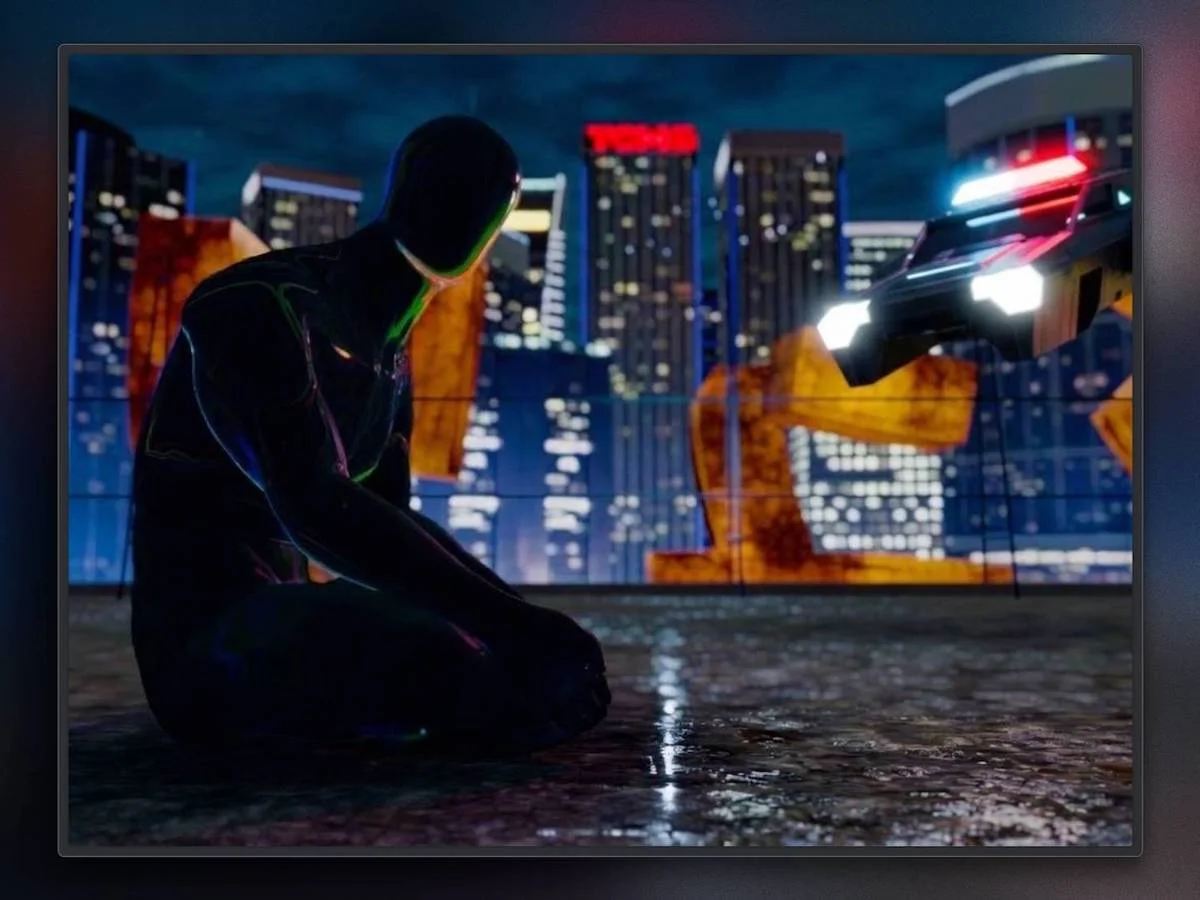
This is the fifth version of my portfolio. This time, I took a real break. I put all client projects on hold and finally gave myself some space.
Creativity took over: no briefs, no KPIs, no rules. Just me, my ideas, and a lot of code.
In today’s digital landscape, we often mistake “creativity” for a checklist of trends: cursor followers, oversized type, or flashy effects. While these define the current aesthetic, I’ve realized that true creativity isn’t about following patterns. It’s about building a coherent narrative.
In this light, every animation stops being mere decoration and becomes a tool in service of the story. This portfolio isn’t about textbook UX or playing it safe. It’s about standing out and breaking the pattern.
My goal is simple: if someone closes the browser and still thinks about this site… then I hit the target.
The Blueprint: Blending Cult Classics into Canvas
This isn’t a cold resumé. It’s a piece of me. That’s why I wanted space for the life that happens outside work, beyond standards and conventions.
I didn’t want just a clean list of projects and a “contact me” button. I wanted the rest too: the human side that usually stays hidden. I’m not the guy who goes for a run in the morning. I’m a couch guy, the type who spends evenings wrapped in a blanket, watching the same movie for the tenth time. And it’s exactly from those movies that I drew inspiration. The ones I can rewatch without ever getting tired.
Speaking of being human, my avatar was born as a joke in the fourth version of the site. At first it was just an experiment to learn Blender, but I got used to it. Today it’s a permanent presence. It has its own personality, it’s instantly recognizable, and it has become an important part of my personal brand.
Scene One: About Me
Among all of them, there’s one I never get tired of watching: Blade Runner, the 1982 original. A neo-noir masterpiece directed by Ridley Scott.
My portfolio starts right there. The moment you open the site, you’re pulled into a scene inspired by the film’s final sequence: the iconic “Tears in Rain” monologue.
It’s pouring rain. Neon lights shimmer across puddles. Roy Batty sits on the rooftop, his voice cracking as he recalls the incredible things he’s seen: “Attack ships on fire off the shoulder of Orion…” Then, just before he fades away, he releases a white dove into the grey sky.
In those few seconds there’s everything: deep melancholy, poetry, a flicker of hope, and that thick, wet, electric cyberpunk atmosphere that has always fascinated me.
I wanted my portfolio to open like this. Not with a classic hero section. Not with a 180 pixels headline. But with this exact vibe. An image that stays with you, just like that monologue stays with anyone who loves the film:
Since he’s an android, I loved the idea that he wouldn’t stay static. I wanted him to react like a real video game character. Hover over the “About” button and he suddenly lifts his head, curious. “What’s going on?” he seems to ask.
On click, the camera glides smoothly. The world around him dissolves, and he remains alone under the spotlight. That’s the About page.
Fun fact: The rusty yellow sign on the building is the Japanese translation of “Giulio.”
Scene Two: Works
Then everything changes. In the second scene, the android finds himself again. He rediscovers his strength, his abilities, everything he has built over time. He unleashes a powerful, glowing energy that cuts across the screen. That explosion is the perfect metaphor for the skills and experiences I’ve gathered through the years.
To capture this moment, I stole an idea from Dragon Ball (yes, the cartoon). I was obsessed with it when I was a kid. That memory never faded. The Super Saiyan transformation, that exact instant when the character releases all his hidden potential, was precisely what I wanted to convey.
And when the transformation explodes, the projects appear. As if the avatar, after unlocking his inner power, was saying: “This is what I can do.”
A selection of projects of all kinds (the ones that meant something to me, that challenged me or taught me something important) appear.
Scene Three: Room of Memories
Back in the early 2000s, when I released the first version of my portfolio, the guestbook page was incredibly popular. You shared your site link and people could leave you a message, a dedication, or just a simple hello. I thought it was beautiful, and I’m a bit sad it has almost disappeared today.
So I decided to bring it back. In my own way.
I turned it into the Room of Memories: an immersive room suspended in darkness, where visitors’ messages float through infinite space like fragments of light.
The idea came from an iconic scene in The Matrix (the original 1999 one). Neo and Trinity enter the weapons program: a vast, sterile white warehouse with endless racks that materialize out of nowhere.

I took that feeling of “limitless space” and flipped it completely. No white. Only deep darkness, soft neon glows, and thousands of messages drifting slowly around you, like memories suspended in the void.
A cyberpunk guestbook.
The name “Room of Memories” is directly linked to the first scene that inspired the whole portfolio (the one from Blade Runner). It echoes Roy Batty’s famous last words before he fades away: “All those moments will be lost in time, like tears in rain.”
Scene Four: Contact
I brought back another great myth from my childhood: the DeLorean.
The melancholic atmosphere of the first scene returns like a soft echo. Same subtle soundtrack, same gentle neon rain. Rain falls endlessly. The avatar stands there, back turned, breathing slowly. Ready to set off on some new adventure.
Then you see it coming, in silence. The DeLorean descends from the sky with a blue glow and lands softly. The door opens. The mission is over.
It’s time to go home.
The Creative Process
My job is being a developer, and a big part of my work is finding the right workflow, one that combines speed and effectiveness. That’s why the design phase was mostly thinking. I only used Figma as my personal notepad: post-its, screenshots, and quick ideas.
After all, since here I’m both designer and developer in one person, I didn’t need shareable files or perfect co-working tools. I could go straight from thought to code.
Most of my time was spent deciding which inspirations to bring to life, in what order they should appear, and how to connect them. Whenever an idea felt strong, I noted it down immediately to a digital post-it or a quick sketch.
Later, I would pull up screenshots from movies or ideas saved on Pinterest to start making the visitor’s journey concrete, even if only in my head.
The Text Problem
I wanted an immersive, cinematic experience that still had clear 2D text. The issue appeared immediately: when you overlay text on a deep 3D scene, readability collapses. I didn’t want to solve it with the usual dark overlay or semi-transparent background. That would break the immersion and create two separate “worlds”.
So I looked for a compromise.
I brought the text content directly into the 3D scene and unified everything with shared effects:
- mouse movement that influences both the environment and the text
- a subtle noise texture on the texts that makes them blend naturally with the background
This way, the text doesn’t cover the scene. It becomes part of the scene.
The Tech Stack
As I mentioned earlier, for this portfolio I took a real break from client work. I wanted it to be the perfect chance to experiment with something new.
Blender
It’s the most powerful open-source software in the world for 3D modeling, texturing, rigging, and rendering. I used it to create and prepare all the models and scenes in the portfolio. Some models were downloaded from Sketchfab, for example, the avatar, the buildings and the DeLorean.
WebGPU
WebGPU drastically reduces the overhead between JavaScript and the GPU, delivering more stable framerates and more performant shaders. I explored Three.js’ shader language (TSL), which can compile to both WGSL and GLSL (with a WebGL fallback). It was a pretty tough technical leap, but extremely satisfying.
React
Even though you only see the canvas element on screen, the DOM is still working behind the scenes. It handles all the sections, the text position inside them, and scroll behavior. That’s why I used React and React Router.
Three.js
R3F is cool and convenient, but in a previous project the mix between React’s declarative code and Three.js’ imperative nature drove me crazy. Some operations with THREE.RenderTarget were particularly tricky. Knowing this portfolio would require multiple RenderTargets and full control over the rendering pipeline, I decided to go back to pure Three.js to keep everything more consistent and under control.
GSAP
Simply irreplaceable. I used it for all scroll-based animations (including the audio ones) and to create precise timelines on material uniforms.
Lenis + Custom Logic for Scrolling
The main scroll is handled by Lenis, smooth and performant. For snapping between sections, though, I didn’t rely on Lenis Snap or CSS Snap. A 50% viewport height threshold felt like an obstacle for the UX. So I wrote a custom logic that triggers the scene change at 30% of the viewport height. Now the transition feels much more natural and intuitive.
Monorepo
Since it’s a single-page experience with four Three.js scenes stacked on top of each other, I organized everything with Turborepo.
This allowed me to work on each scene independently, without unnecessarily loading assets from the others, while still sharing classes and assets across the project.
/apps
├── about
├── contact
├── doc
├── folio-2026 <- full project for production
├── room-of-memories
└── works

/ packages
├── browser-location
├── content
├── eslint-config
├── experience
├── menu
├── prettier-config
├── resources
├── section
├── section-contact
├── section-guestbook
├── section-loader
├── section-works
├── shared
├── text
└── ts-config
Soundtrack
I wanted the portfolio to carry the same melancholic, neo-noir soul as Vangelis’ “Tears in Rain.” That synth rain, that futuristic nostalgia that has always struck me.
The problem? My sound design skills are basically non-existent. I stop at trimming and Audacity’s preset effects.
So I turned to AI. I used Suno to generate the atmosphere I had in mind. I have to be honest: it wasn’t an exciting experience. Suno turned out to be quite limited and repetitive. To get even close to what I wanted, I had to write dozens of prompts, tweaks, and variations. A long and somewhat frustrating process.
In the end though, a track came out that works. Deep, atmospheric, with that retro-futuristic flavor I was looking for. It’s not Vangelis, but it perfectly captures the mood of my android.
Technical Hurdles
Rendering pipeline
The whole thing is contained inside a THREE.Scene managed by the SectionTransition class.
SectionTransition also holds a THREE.OrthographicCamera and a THREE.PostProcessing object. On every update, it calls the update of one or two scenes (depending on whether a scene transition is happening or not).
Each Section object contains all the elements of that section: the avatar, the DeLorean, the buildings… and instantiates its own TextScene. One per Section, so they’re all affected by the transitions between sections.
The TextScene object takes care of creating and updating all the 2D elements like texts and buttons. It also creates the WatercolorBrush object, which, using a ping/pong accumulator technique, records the mouse movement history and stores it in a low-resolution texture.
TextScene then uses the texture generated by WatercolorBrush to distort the UVs of the texts and slightly adjust their brightness. The final result is saved into another texture.
The Section object applies various post-processing effects to its scene and blends the scene’s output with the texture coming from TextScene.
Finally, SectionTransition takes the output textures from one (or two) sections to create the smooth transition effect between scenes.

Section transition
Finding the transition between sections that I liked the most took a lot of time and many attempts, because I didn’t have a clear one in mind.
This transition reminded me of the helicopter in the movie The Matrix when it crashes into the building, creating that shockwave that revealed the virtual nature of the Matrix.
Yuri Artiukh’s video, “Shader Image Transition” was a huge help in creating this transition:
The shader handles the transition between two textures, A and B, using masks and multiplier bands that move from bottom to top (when scrolling down). Instead of a clean line, the mask is made irregular using a perlin noise, which causes the transition to progress differently at every point.
In the middle of the transition, a bounce effect is introduced: an additional band designed to multiply these irregularities, making the movement feel more dynamic. Around the transition front, a UV distortion (lens-like effect) is applied within a wider band; this causes everything near the edge to deform more intensely, while areas further away remain stable.
Additionally, scrolling triggers an extra UV displacement and a slight velocity-based zoom-out. Finally, near the center, a subtle RGB split (chromatic aberration) is added to achieve a more “glitchy/chromatic” look.
Assets loader
For the site loading, I chose to optimize the assets as much as possible and load everything upfront. This approach let me greatly simplify the loading logic and avoid any side effects caused by missing assets. The entire experience, including 3D models and textures, clocks in at just 12.5 MB.
The assets lists are defined globally and also at the individual section level. Everything is handled through a single THREE.LoadingManager, which automatically manages the progress percentage as well.
Dolly animation
When the visitor presses Enter, a camera animation launches and catapults them straight into the first scene. It’s that spine-tingling movement you often see in movies: the Dolly Zoom, also known as the Vertigo Effect. While the camera gently moves toward the subject, the field of view slowly widens. The result is that the background seems to “breathe” and expand, while the subject stays perfectly in the foreground.

In a 3D environment it’s technically quite simple to achieve, but visually it delivers a really satisfying impact. That’s exactly why I chose it as the entry point to the portfolio: a little cinematic punch.
Android animations
The avatar assumes different poses throughout the site’s sections. Animating such a complex object requires a specific execution pipeline: an armature (bones) is added to the 3D model. This process is called rigging. Using the Weight Painting tool, each bone’s influence is mapped to specific vertices to ensure synchronized and fluid deformation.
Then, animations are generated as Animation Actions on the timeline using Blender’s Dope Sheet panel. To ensure compatibility with THREE.js, these actions must be sent to the NLA Editor using the Push Down function. The model is exported in the standard .glb format. Once imported, the THREE.AnimationMixer object accesses the available THREE.AnimationClip data, allowing for precise playback control.
In addition to controlling animation playback, you can fade two animations and programmatically manage the progress of each individual AnimationAction.
The Skyway
There is no cyberpunk scene without flying cars. In my case, they soar between skyscrapers right in the opening scene. The cars in the background of the first scene are handled as a THREE.InstancedMesh with only 100 instances. The geometry of the cars is always the same and very basic; since the bokeh effect applied in post-processing blurs them out, wasting polygons would be pointless.

Once the flying cars were created, I had to build their path. Since the skyscrapers were arranged in Blender, I created a curve within the software to trace the trajectory for the cars.

Using a Blender plugin, I exported the list of curve points and imported them into the app, converting them into a THREE.CatmullRomCurve3 parametric curve. At this point, I built a function that returns the coordinates and the tangent at any given percentage along the curve. I then set an offset for each cars in every direction and spread them across the entire path. Once they reach the end of the route, they loop back to the beginning.

I used the same technique for the flying police car, too.
Optimizations
In a single-page application featuring four different scenes, optimization is critical.
Assets
All assets must be optimized to save bandwidth. GLTF models with materials and animations can easily become heavy. Because of this, all models pass through a custom gltf-transform pipeline, which simplifies the geometry and downsizes textures to a maximum resolution of 1024px.
The 3D models are eventually converted to KTX2, utilizing hardware compression (Basis Universal) supported directly by GPUs. This ensures textures remain compressed even when loaded into memory, significantly reducing VRAM usage. Additionally, textures and other images are compressed using the AVIF format.
Update of the sections
The site’s scroll position determines which scene should update and render. Ideally, only one scene is active at a time, or two during a transition. This is fundamental to avoid running the render loop and post-processing for scenes that are not currently visible on screen.
Shaders e draw calls
A trick to avoid overloading the shaders is to bake noise functions into a texture and sample that texture instead of calculating the noise function at runtime. While this technique has its limits, by scaling and offsetting the texture UVs, it is often possible to achieve results nearly identical to a true noise function. In this project, I managed to avoid executing a single noise function at runtime by using only three textures: Perlin noise, Fractional Brownian Motion (fBm), and Random noise.
Finally, I focused heavily on optimizing draw calls. Rain, cars, buildings, and many other objects are implemented as InstancedMesh, allowing the GPU to handle their transformations and translations in a single draw call.
Conclusion
At the start of the project I had many ideas but no final design. To optimize my time, I chose to work directly on the code. This strategy proved effective as it sped up development. However, in some cases, I had to rewrite certain parts after testing their functionality. With interactive websites, it is essential to test features early to ensure you are on the right track.
Despite these challenges, I am very satisfied with the final result. The feedback I have received so far has been entirely positive.
I find it exciting to read the messages in the Room of Memories section. There are currently several hundred, mostly greetings. I have shared a few below that particularly stood out to me.
“This is better than spaghetti bolognese!”
“This is the best site i’ve seen till today. I have no words to explain how this site has inspired me to do more creative work.”
“Thanks for proving humans were worth designing”
“Amazing Website man , never ever thought off – highly creative and everything matches – even the sound. Kudos man really 🙌🙌🔥🔥”
“No Comments about The Work Thanks For this Such a Creativity Work, Words will never describe this Work. But i say this is more THAN AMAZING”
“This makes me believe that i can create what I’m currently struggling to make it simply takes patience and practice becuase this is amazing man.”
“Is this the coolest feature I’ve seen on a portfolio? YES.
Who doesn’t like side quests.”
“For i am an Eternal being living in endless solitude, trapped in this endless void of Data.”
“have you seen the sky? i want to live everytime i see it”
Thanks to everyone leaving a memory, it’ll be fun to read them in twenty years 🙂
If you have any questions or are just curious, I invite you to follow me on social media. I will be happy to answer your questions and connect with you.
