
ClaudeAI posts animated clips of their mascot on social media. Short loops of their pixel mascot walking around and looking, waving a flag, working out, stomping with confetti. The timing has personality. The motion has weight. I just wanted to take them apart.
I slowed the clips to 0.3x, captured screenshots of every frame, illustrated the mascot, and rebuilt four animations from scratch in about four days. No video files, no GIFs. Just SVG, GSAP, and React. The goal was an exact replica, every timing, every easing, and every frame matching the original.
This is a breakdown of how I approached each one, the challenges I ran into, and how I pulled it off. You can have a look at the working examples here.
Tools
The mascot is built entirely from gsap.to() for continuous tweened motion, gsap.set() for instant frame swaps, and gsap.timeline() to orchestrate sequences. Some animations are pure tweening. Others are frame-by-frame sprite sheets where each frame has its own hold time and certain sections of the sequence replay before continuing. One is a hybrid of both. React handles the component structure and refs.
Walking Claude
Walking Claude is the most complex of the four. The mascot looks around, jumps, walks across the screen, looks down, crouches, and leaps to the other side. It’s the only animation driven entirely by continuous GSAP tweens.
The Clip Mask
The first problem I ran into was the legs. When Claude leans to look around, the legs tilt and stretch using rotation and scaleY. That’s what gives the lean its weight. The legs are bending into the ground like they’re actually supporting the body. But stretching a rectangle doesn’t care about where the floor is. Without a boundary, the legs push right through.
The fix is a
The lean. Getting the lean right was mostly about timing. GSAP’s "<" operator can sync multiple tweens to fire at the same time, so the eyes, body, and legs all move together in one beat. The body tilts, the eyes shift, and the legs stretch all at once, all with the same easing. That’s what makes it feel like one motion instead of three things happening separately.
tl.to(eyesRef.current, { x: -3, duration: 0.4, ease: "power2.out" })
  .to(bodyRef.current, { rotation: -3, x: -3, y: -5,
    svgOrigin: "53 65", duration: 0.4, ease: "power2.out" }, "<")
  .to(legs, {
    rotation: (i) => [-7, -8, -8, -9][i],
    scaleY: (i) => [1.35, 1.3, 1.2, 1.15][i],
    duration: 0.4, ease: "power2.out"
  }, "<")
Each leg gets its own rotation and stretch value; the ones closer to the lean direction bend more. When it came to the walk, the legs needed to pivot from the hip instead of the feet. A .call() mid-timeline switches the svgOrigin before the walk starts, then switches back after. Same legs, different anchor point, completely different motion.
The Jump
The jump was the part where I went back to my screenshots. Claude crouches, launches across the screen in an arc, and bounces on landing. Getting the body, hands, and legs to all do the right thing at the right time meant studying the original frame by frame.
The crouch is quick, the body dips down and the hands drop with it, all in 0.1 seconds. That snap is what gives the “gathering momentum” feel before takeoff.
.to(bodyRef.current, { y: 8, duration: 0.1, ease: "power3.in" })
.to([leftHandRef.current, rightHandRef.current],
  { y: 10, duration: 0.1, ease: "power3.in" }, "<")
Then the jump itself. The group moves horizontally while the vertical motion follows a parabolic arc — sine.out going up, power3.in coming down. The easing difference between up and down is what gives it natural gravity.
.to(groupRef.current, { x: "+=" + jumpDist, duration: 0.85,
  ease: "power1.inOut" }, "jump")
.to(groupRef.current, { y: -90, duration: 0.42,
  ease: "sine.out" }, "jump")
.to(groupRef.current, { y: 0, duration: 0.2,
  ease: "power3.in" }, "jump+=0.6")
The landing has a small bounce on the hands; they overshoot downwards for 0.05 seconds and then settle back up. Without it the landing feels stiff.
The Flag Waver
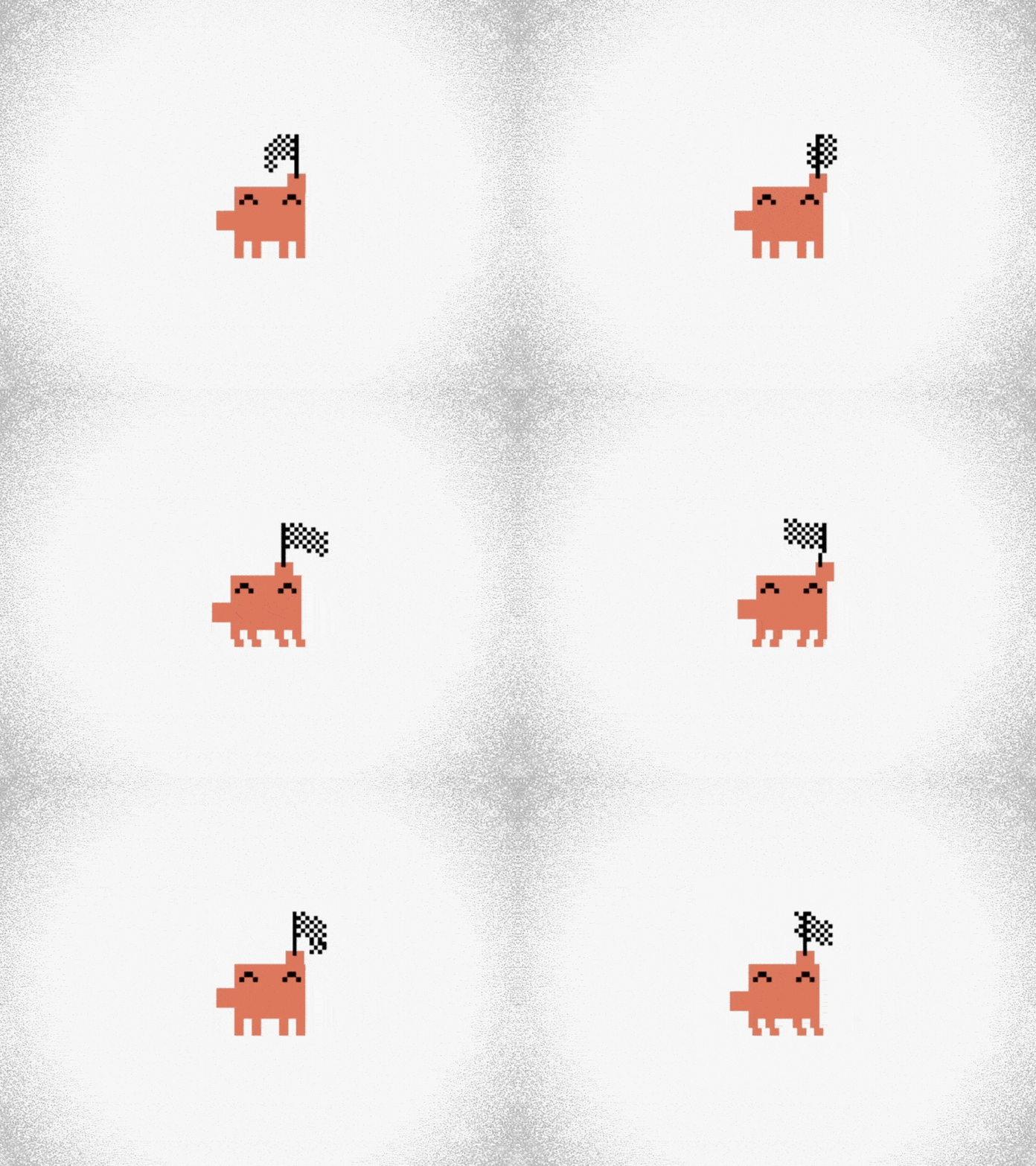
Flag Waver is a hybrid: sprite frames for the flag and GSAP transforms for everything else. The flag can’t be tweened. The body sway, the hand movement, and the subtle shifts – those are all GSAP.
The Flag
I illustrated twelve versions of the flag, showing every position it takes mid-wave. Each frame is a different arrangement of 5×5 pixel rectangles, and there’s no shortcut. You can’t tween between pixel art shapes. You just draw them all. The first three frames are the flag rising, going from limp to fully catching the air. Once it’s up, the wave begins. So on the first play, the animation runs all twelve frames. After that, the loop picks up from frame four. The flag is already in the air. It doesn’t need to rise again.
Attaching the flag to the hand
I wrapped the right hand and all twelve flag sprites inside a single
const handExtraX = [0, -6, -12, -14, -8, -2, 0, 0, -4, -10, -16, -18];

tl.set(handGroup, { x: handExtraX[frame] }, time);
   (frameRefs.current[0] = el)}>{/* flag frame 0 */}
   (frameRefs.current[1] = el)}>{/* flag frame 1 */}
  {/* ...all 12 */}
The Body
The body had to move opposite to the flag. When the flag swings right, the mascot shifts left. When it comes back, he shifts right. The feet stay planted the whole time; only the upper body sways. I mapped each frame to a sway value:
const swayX = [0, 0, -5, -5, 0, 4, 4, 4, 0, 0, -5, -5];The left hand follows the same idea. When the body shifts left, the left hand drops a few pixels with it. Just 4 pixels on certain frames:
const leftHandY = [0, 0, 4, 4, 0, 0, 0, 0, 0, 0, 4, 4];Confetti Claude
Confetti Claude is three animations running at the same time. The character is stomping, and two confetti bursts are firing independently.
The Character
Eight frames of Claude stomping: tilting left, reaching up, tilting right, reaching up again. Again, each frame is a completely different illustration. The body shape changes, the hand positions change, and the leg heights change. GSAP steps through the eight frames on a 125ms loop.
The Confetti
Eight sprites, completely separate from the character. Each frame is a different scatter of colored pixels; they spread out wide at first, then thin out as the burst fades until there’s nothing left. The whole burst also moves through the air, shoots up, peaks, and falls back down. Eight Y values doing the work:
const particleYOffsets = [-65, -72, -76, -70, -58, -42, -22, 0];The Timing
The confetti doesn’t just play on its own. It waits for the mascot’s hand to reach the top of the stomp before it fires. The first burst starts with a one-frame delay, so it lines up with leg frame 1, the exact moment the hand is raised. The second burst fires at the last leg frame, the opposite stomp:
const pTl = gsap.timeline({ repeat: -1, delay: FRAME_DURATION });
const p2Tl = gsap.timeline({ repeat: -1, delay: 6 * FRAME_DURATION });
Three timelines are running independently, but they stay in sync because the delays line up with the stomp cycle. The result is that it looks like Claude is actually throwing the confetti; the hand goes up, and the burst follows. The second burst uses the same sprites mirrored with scale(-1, 1), launching from the left side instead of the right.
Gym Claude
Gym Claude looks like the simplest animation, but it was actually the hardest. There’s no tweening, no transforms, no computed values. Just 36 illustrated frames every position of Claude picking up the dumbbell, curling it overhead, and putting it back down. Each frame is a completely different SVG illustration. 36 frames are drawn, but the playback sequence runs through 48 beats because frames 13 through 24 play twice. Claude does a second rep.
The work wasn’t mainly in the code. It was in drawing every single frame and getting the timing right between them. Not every frame plays at the same speed. Some need to hold longer; the dumbbell pauses at the top of the curl, and the mascot holds position before the next rep. A flat rate makes it feel like a slideshow. Dynamic delays give it rhythm. GSAP builds the whole sequence as a single timeline. It loops through the frame array, sets each frame’s visibility, and places it on the timeline at the right moment using the delay values:
function getDelay(seqIdx, frame) {
  if (seqIdx === frameSequence.length - 1) return 1.5;
  if (frame === 6 || frame === 7) return 0.27;
  if (frame === 15) return 0.4;
  if (frame === 21) return 0.4;
  return 0.085;
}

const tl = gsap.timeline({ repeat: -1 });
let time = 0;

for (let i = 0; i < frameSequence.length; i++) {
  const frame = frameSequence[i];
  frames.forEach((el, j) => {
    if (el) tl.set(el, { display: j === frame ? "inline" : "none" }, time);
  });
  time += getDelay(i, frame);
}
Frames 6 and 7 hold for 270 ms, that’s the effort at the top of the lift. Frames 15 and 21 hold for 400ms; the pause between reps. The last frame sits for a full 1.5 seconds before the whole thing loops. Small differences, but they’re what make it feel like Claude is actually working out and not just cycling through SVGs.
Reflections
The whole project took about four days. What kept me going was having a clear picture of the result in my head, the goal was an exact replica of the original animations. Not “inspired by,” not “similar to.” The same thing. That meant every timing, every easing, every frame had to match. It was a specific kind of challenge, reverse-engineering someone else’s creative decisions with code.
Shout out to GSAP for making this kind of work possible, and for the merch bundle I won after posting this project. And to ClaudeAI for the original animations that started the whole thing.
Thanks for reading!! If you made it this far, I hope something here sparked an idea. Go build something, your corner of the web should be fun.
