
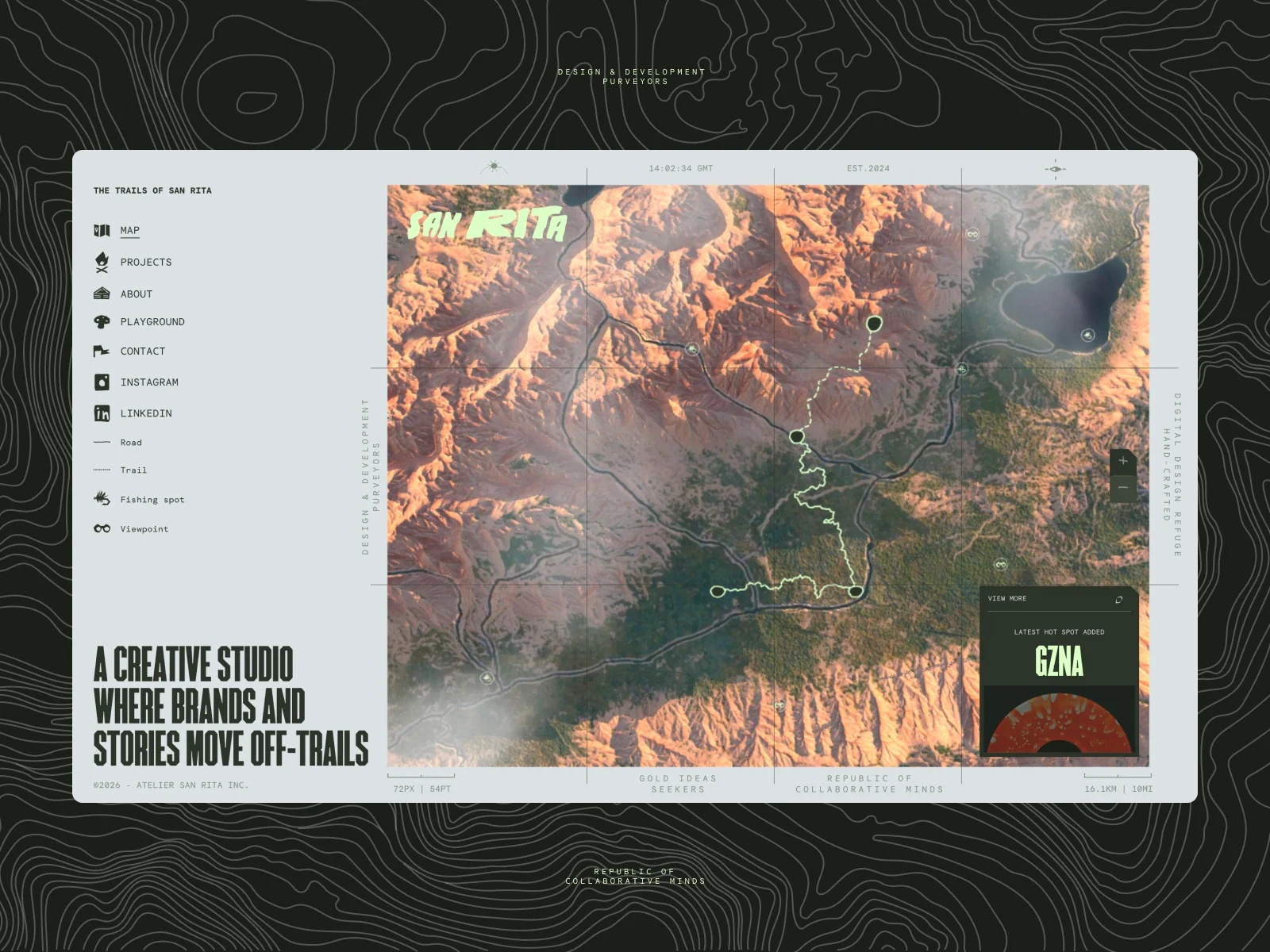
For a long time, we felt a deep-seated need to build something different, a digital space that truly felt like us. We refused to settle for just another “classic” agency website draped in the usual black-and-white minimalism.
As outdoor enthusiasts, we wanted our site to reflect our specific vision of the digital world and the history that shaped us. For a full year, we obsessed over how to create a 3D map that could recreate the soul of the places that left a mark on us, specifically California and Canada, all while capturing the charm of those ultra-detailed, vintage National Park maps.
A Vision Takes Shape
Julien Sister – Creative Director at San Rita
The turning point came when we met Sébastien while working on a separate project; the “click” was instant. The connection between his technical world and our creative vision was undeniable. While the map had been our greatest challenge, Sébastien immediately brought the solutions we had been searching for. At that moment, the project officially took flight, and our world finally came to life.
Tools & Stack
Sébastien Lempens – Creative developer at Pixila
To bring this project to life, it was necessary to choose a coherent stack and tools for this project.
DatoCMS was the only requirement for the backend; for everything else, I curated the following tech stack:
Feature breakdowns
1. The Map
The idea was simple: display a top-down 3D map with drag-and-drop navigation to explore its hidden details. It primarily serves as a hub to access the site’s different sections.
We briefly considered generating the map entirely procedurally via shaders, but needed more visual control. So I went with Blender for 3D modeling and Adobe Substance 3D Painter for texturing.
Since the Sanrita team had a precise topology vision, I used this super handy tool to generate a heightmap from geolocation data.

Once the heightmap was generated, I imported it directly into Blender to create the topology.
The key question at this stage: “How do you display an ultra-detailed map that’s also lightweight?”
The trick: keep the high-detail version to bake the texture, then apply it to a much lighter low-poly mesh.

2. Visual & interaction design
To bring San Rita’s world to life, I moved beyond static design and into the realm of immersive motion. Our thinking centered on the concept of “digital exploration,”using scroll-based effects as a storytelling engine.
Instead of a traditional linear scroll, the movement acts as a camera lens traversing a 3D landscape. Through custom digital texturing, I recreated the tactile, grainy texture of vintage paper maps, blending the warmth of the past with the sharpness of modern code.
By granting users the freedom to navigate the map at will, we transformed what began as a standard portfolio into a living, dynamic experience. The site evolves into an interactive territory where the user is no longer just a visitor, but a true explorer of our digital world.
3. Embarking on Projects
The “Projects” page was designed to reflect the site’s exploratory essence. The experience is built around an infinite scroll that simulates a trekking journey.
To create the trail, I used a simple SVG path that repeats indefinitely along the vertical axis. Projects are appended one after another in real-time as the user scrolls, allowing for greater flexibility when adding new content while maintaining a seamless infinite scroll mechanism. The photos are textures rendered within material shaders, enabling a “cloudy” or atmospheric animation on the edges. This further enhances the sense of mystery and adventure.
4. Nested scrolling
Implementing infinite scroll on the Playground and project pages was tricky. I needed to handle two scroll systems at once: the page’s natural scroll and the cards’ infinite loop.
My first attempt used GSAP ScrollTrigger with a sticky system, but it was a bit buggy, especially on mobile. I needed something simpler and bulletproof.
The solution: Position the entire infinite grid as position: fixed behind the page UI. Then cut a “viewport hole” (empty container) where the grid should appear. Want longer scroll? Just increase the hole’s height. Simple. Reliable. Works everywhere.
Pro tip: I kept GSAP’s gsap.utils.wrap() for seamless infinite looping, paired with the Observer plugin for scroll events.
const observer = Observer.create({
	target: containerRef.current,
	type: 'wheel,touch,pointer',
	onChange: (self) => {
		scrollState.current.targetVelocity += self.deltaY * velocityFactor;
	},
});

const update = () => {
	const state = scrollState.current;
	state.velocity += (state.targetVelocity - state.velocity) * 0.1;
	state.targetVelocity *= state.friction;

	cols.forEach((col, i) => {
		const isOdd = i % 2 !== 0;
		const factor = isOdd ? -1 : 1;
		state.yPositions[i] += state.velocity * factor;
		const halfHeight = col.offsetHeight / 2;
		const wrappedY = gsap.utils.wrap(-halfHeight, 0, state.yPositions[i]);
		state.yPositions[i] = wrappedY;
		gsap.set(col, { y: wrappedY });
	});
};

gsap.ticker.add(update);
Architecture & Structure
Built on Next.js 16’s App Router, the project uses route groups and parallel routes to manage public pages and intercepted contact modals. Server Components are the standard, with “use client” reserved for interactive islands. Data flows from DatoCMS through a typed GraphQL client, utilizing ISR via webhooks to ensure content stays fresh without full site rebuilds.
The 3D experience relies on a persistent React Three Fiber canvas mounted outside the layout to prevent remounting during navigation. Assets are optimized with Draco compression and KTX2 textures, while custom visual effects are achieved by injecting GLSL into standard materials via the onBeforeCompile hook. This mutation approach preserves native PBR lighting and tone mapping while enabling complex noise and distortion effects driven directly by GSAP for zero-overhead performance.
Motion is coordinated through a shared RAF loop where Lenis handles smooth scrolling and GSAP manages all property tweening. Page transitions use a custom CSS clip-path mask managed by a Zustand store, intercepting navigation to sequence animations before the router pushes changes. Performance is further tuned via the React Compiler for automatic memoization and a manifest-driven preloading system that handles assets in parallel before the initial render.

A Journey Through the Pages
The architecture of sanrita.ca was designed as a multi-layered experience, where each section employs a distinct technical system to match its narrative purpose.
On the Homepage, the core of the experience is a “Global Discovery” mode, driven by a camera system that glides over a unified 3D map of Canada and California, syncing high-level storytelling with spatial coordinates.
As users transition into the Case Studies (projects page), the site zooms into a detailed layout. This section is built entirely with a lightweight HTML/JS/SVG architecture, simulating a zoomed-in view of the trail. While the 3D engine is stepped down, we maintain visual continuity by applying custom shaders directly to the project photos. This allows for atmospheric edge effects and vaporeous animations, preserving the mysterious, adventurous feel of the main journey without the performance cost of a full 3D scene.
By decoupling the heavy terrain rendering of the main map from the lighter, interactive components of the sub-pages, we ensured that the most resource-intensive effects are only active when they serve the user’s focus, maintaining a blazing-fast experience across the entire site.

Reflections
Julien Sister – Creative Director at San Rita
Lessons from the Trail
What we loved most about this journey was the opportunity to break the mold and create something truly singular in the digital studio landscape, a space that feels less like a corporate portfolio and more like a personal manifesto.
The synergy within our team and the collaborative spark with Sébastien turned what could have been a rigid technical build into a fluid, creative exploration.
However, the path wasn’t without its hurdles; the toughest part was the discipline of “killing our darlings”, deciding which ambitious features to set aside for the inevitable “Version 2” to ensure a polished launch.
Looking ahead, if we were to rethink one aspect of the architecture, it would be the automation of our spatial content. Currently, placing new landmarks requires a hands-on technical touch; for our next evolution, we aim to build a bridge between our CMS and the 3D environment, allowing new “points of interest” to populate the map automatically.
It’s a challenge we’re already eager to tackle, proving that for us, the map is never truly finished, it’s just waiting for the next discovery.
