
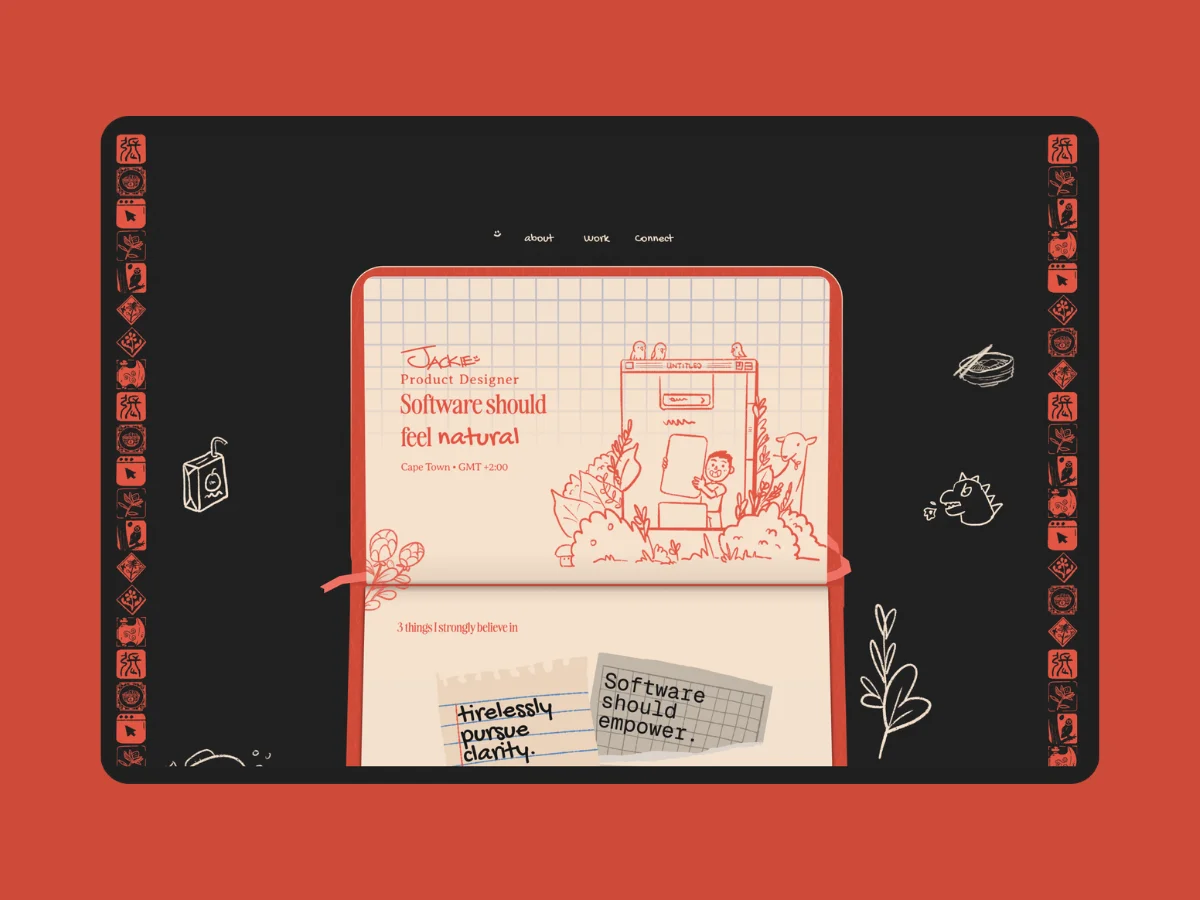
Like any good online recipe, I’m going to start with the meta-story before I show you anything useful. Then I’ll walk through what I built, and break down the two interactions people asked about most.
What follows is part design story, part process breakdown: from the initial reference point and the idea behind the portfolio, through to the visual decisions and a closer look at two interactions built in Framer.
How it All Started
It started with a Japanese book cover design.

Not a brief, not a mood board, not a design system. Just one poster I really liked, and a vague feeling that my portfolio should somehow look like that. For a long time, that was my plan. And for a long time, it didn’t work.
This is the story of how I scrapped it, found a better question to ask, and ended up building something a lot of people apparently really liked. 😅
The Problem With Chasing a Reference
Like most designers, I started my portfolio process by looking for inspiration. Pinterest, Cosmos, X — the usual spots. I landed on a vintage Japanese book cover I loved (see above), and I spent months trying to make my portfolio look like it.
The mistake wasn’t the reference. The mistake was that I was translating a style instead of a concept.
Everything became: “How would this poster look as a UI?” And the answer kept being: not quite right. The poster had qualities I loved, but pulling those qualities into a screen without understanding why they worked just produced something that felt like a costume, not a point of view.
After enough months of this, I did what every designer eventually does.

I scrapped it.
But making that mistake brought me somewhere more interesting. It forced me to ask a better question, not what my portfolio looks like, but what it feels like, and why (I was also reading Start with Why – Simon Sinek at the time, 10/10 would recommend)
Starting With a Concept Instead of a Look
Going back through all my Pinterest boards and Cosmos saves, I forced myself to look for an idea rather than a visual reference. I was going wide, art movements, subcultures, physical materials, anything outside of UI. I didn’t want it to look like every other design portfolio out there, so I deliberately looked the other way.
At the same time I was questioning what a portfolio should even be. My take: it should be about you as a designer, not just the work itself. A collection of screenshots with labels is easy. A point of view is rare. So I was looking at all this inspiration through the lens of who I think I am.
The concept I’ve landed on is a bit abstract: it is the feeling of having objects that are there to quickly capture an idea. It is temporary, yet very important to the process and the sum of the output.
The concept is a bit abstract: objects that exist purely to capture a thought before it disappears. Temporary by nature, but essential to everything that comes after.

This is my “inspo” board, how I like to make this:
- Keep it bounded. One section, fixed size. No expanding the frame to fit more stuff in. The constraint is the point.
- Leave notes. What did I like about this? What am I actually trying to steal? If I can’t answer that, I haven’t looked at it hard enough.
- Curate the layout. Size, spacing, what sits next to what. Treat it like a mini design exercise. The way it looks affects the way it feels to reference later.
- Have limits. Once the sections are full, stop. Don’t go looking for more. Actively stay away. This keeps you focused and stops you chasing the next shiny thing before you’ve done anything with the last one.
- I broke this rule a lot. Every time I did, I’d pivot, then pivot back, then wonder why I’d wasted so much time going in a circle. Learn from my mistakes!
As I’m making my board to capture this idea, I also write down the qualities that make this idea what it is:
- Spontaneous, not precious
- Imperfect by design
- Personal, tactile, immediate
- The kind of thing you do when you’re thinking, not performing
The concrete reference I kept coming back to: doodling on paper. That was the physical manifestation of all of these. The sketch you scribble in a notebook margin, the drawing that exists only because you needed to think. It’s a perfect object of capture.
And suddenly every design decision had a filter. How it looks, how it functions, how it behaves. Everything runs through the same question: does this feel like something you’d use to capture a thought, not display one?
Yes? Do it. No? Scrap it.
And I was ruthless about it. There were components and interactions I genuinely loved, that I’d spent real time on, that just didn’t fit. Gone. That’s the thing about having a north star, it makes decisions faster and also harder. You can’t keep something just because it looks cool.
I stopped comparing against “does this look cool” and started asking “does this fit.” Much better problem to have, especially when you want to keep your sanity.
How the Concept Showed Up in the Design
The portfolio is designed in Figma and built in Framer, mostly using native Framer capabilities. The design process took significantly longer than the build. Once I knew exactly what I was making, the execution was relatively quick.
The concept translated into four concrete design decisions:
Actual doodles
Hand-drawn elements. These aren’t stock illustrations or SVG icons, they’re things I drew on my iPad in Procreate. I took a screenshot of the design, pasted it in Procreate and just doodled on top of it all
Texture
The portfolio needed texture, but it couldn’t be dirty. If you’ve worked with textures before, you would know there’s a fine line between having a texture look “dirty” because you want the texture to be seen, and having a cleaner, crisper look because you want it to be felt. I’m aiming for the latter, with the use of:
- Using shapes to provide the physical feel, like the shape of a tear in the paper.
- Way more subtle textures and just trusting that it’ll be felt
- Crisper highlights by using top borders instead of a light inner shadow.
Colour
I took a screaming U-turn from my previous portfolio, which had a bunch of different saturated colours. This time I’ve tried a more limited set (Primary + Black and White only)
Constraint is also a form of direction. Instead of deciding what to go for, you’re deciding what to rule out.
Typography
I used a handwritten font paired with a serif.
The handwritten type is the doodle itself, the freehand mark, the thing you put down quickly. The serif plays the role of the printed grid lines on a notebook. The structure you’re drawing on top of. Two things that shouldn’t go together, but actually make sense as a pair once you see it that way.
From here, it’s reps. Iterate, move on, iterate again. I’m not trying to get each idea to 100%, just far enough to get an idea.

The Interactions That Made It Physical
Ok, so now let me take you through how I did these two interactions.
The navigation

I first created the doodles in their different states using the Stroke feature in Framer. Make sure to keep the naming consistent, as you will be using a transition to move the actual lines.

Once I have the different states of my doodle, I then hooked it up to the main nav component. The process is exactly the same, different hover states will trigger the different doodle states. And because the name is the same and there’s a transition applied to it, it will “smart animate” like in Figma.
The card flip
This card trick has two parts to it:
- The card animation: A flip that cuts directly from front to back. The key was using delayed animations on the in-between states, so there’s a moment where the card is edge-on, neither face fully visible, before it resolves to the other side.

- The sections as triggers: Each of the cards has a corresponding #section. The card component is set to trigger when it hits each section, using Framer’s scroll animation. So your scroll controls the flip, not a click.


What I’d Tell Someone Starting This Process
Sounds obvious in retrospect. Find a concept, run everything through it, done. But finding a real concept takes longer than finding a reference, and it requires being honest about who you actually are, not who looks good to a hiring manager.
The Japanese book cover phase wasn’t wasted. It taught me what wasn’t working, which got me to the right question. Sometimes that’s the only way.
A few things that helped:
- Look outside UI. If you’re looking at other portfolios for inspiration, you’ll end up making another portfolio.
- Write down the qualities, not the visuals. Not “vintage Japanese book cover” but “temporary, personal, made to capture not display.” The qualities travel. The visual doesn’t.
- Be ruthless with the filter. Loving something isn’t enough.
The north star doesn’t just tell you what to make. It tells you what to get rid of. That’s the more useful half.
