
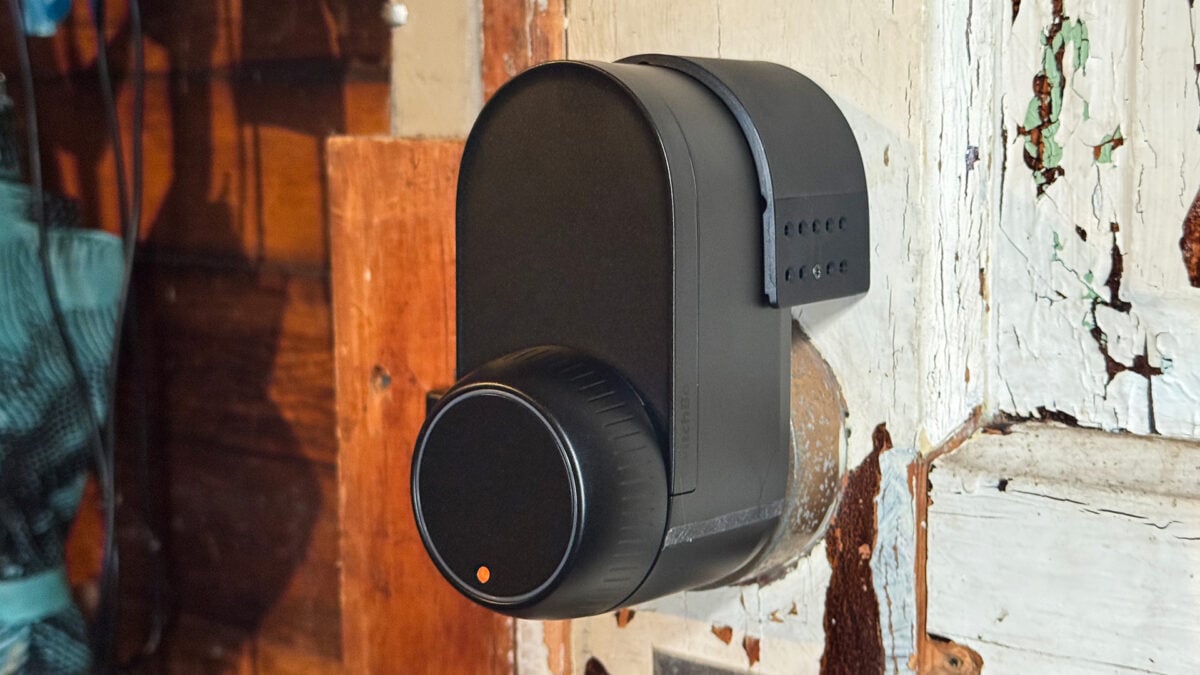
SwitchBot, which made its bones with a tiny button-pressing smart home robot, loves a niche. Sure, it makes its share of typical smart home devices, like sensors or robot vacuums. But it’s the products like the SwitchBot Lock Ultra, a retrofit smart lock that in some cases doesn’t make you ditch your existing lock hardware, where this company tends to stand out.
The $140 Lock Ultra works just like other retrofit smart locks if you’re using it with a typical deadbolt. You swap it for the indoor thumb turn portion, and Bob is, as they say, your uncle. Where it differs is that for $20 more, it comes with an adapter kit that lets it work with jimmy-proof and mortise locks the same way the original SwitchBot lock worked with normal deadbolts—rather than replacing your lock hardware, it slips over it and operates it for you.
That’s the part that piqued my interest. My detached garage’s pedestrian door is outfitted with a jimmy-proof lock—that’s the kind with interlocking loops on the door and its frame that are secured by thick bolts which slide vertically through them when they’re lined up. I’ve wanted to smarten it up for years, and SwitchBot’s fix is effectively my only option that doesn’t involve major door surgery. (As far as I know, my only other option is a questionable adapter for the August Smart Lock Pro I once had on my back door.)
SwitchBot Lock Ultra
A versatile retrofit smart lock with good ideas about modularity but that isn’t the best choice for a high-traffic door.
- Easy installation
- Lets you keep your existing deadbolt
- Modular design
- Works with unusual door locks
- Removable, rechargeable battery
- Embedded backup battery
- Matter-compatible with hub
- Bluetooth connectivity slows things down
- Finicky calibration
- Matter compatibility requires hub
- Keypad add-on necessary for reliable operation
I like the Lock Ultra, either as a fix for my weird garage lock or a regular deadbolt thumb turn replacement. Having the smarts only on one side of your door has drawbacks, sure; like that you’ll still have to use a physical key or otherwise be patient with fiddly smartphone-based unlocking. But if your needs are simple and you just aren’t interested in a full smart lock, you could do far worse.
Sneaky smart lock
No residential door lock is impregnable, but it’s nice to have options, and the Lock Ultra’s included adapters let you use it with just about any existing deadbolt, likely including the one already on your door. That means the keys you’ve already given out to your family and friends still work, and you don’t have to advertise to the neighborhood that you’re the hoity-toity type who can afford a fancy techno-lock.
See Smart Lock Ultra at Amazon
The curvy, matte black design of the Lock Ultra looks nicer than most competing devices, too. Maybe a bit nicer than the garage door I tested it on deserves, in fact. It uses a rechargeable battery pack that’s easily popped out after sliding the front cover up. SwitchBot says it takes about six hours to charge from fully drained, and that a charge lasts about a year, assuming 10 locks/unlocks per day. While you’re charging the main battery, the Lock Ultra’s backup battery can keep it going, minus certain features like auto-locking.
For a normal deadbolt, the Lock Ultra requires some disassembly, but is fairly straightforward and involves a mounting plate and whichever of its three adapters fits your specific deadbolt’s spindle. Putting it on my garage’s jimmy-proof lock was even simpler: I just had to slip a grippy adapter over the thumb turn, the lock over that, then attach a spacer that let me stick the whole thing to the door with the included adhesive. I’d worry about that adhesive holding firm in a hot summer, but the lock stayed put over the week-plus of upper Midwest winter I tested it in.
From the outside, my garage door worked just as it did before, only now I could tap a button in the SwitchBot app to unlock it. Doing so could take anywhere from one to 10 seconds, depending on whether I was already connected to the lock via Bluetooth. But at least that was reliable; when I tried to use it with Apple Home—using Matter, which is available if you have a SwitchBot Hub 3 or Hub Mini—it was very slow and often failed to work at all, whether I was asking Siri to do it or tapping a button in the Apple Home app. It’s nice that the hubs give it Matter compatibility, but controlling the Lock Ultra from a third-party ecosystem was unreliable enough that I wouldn’t recommend buying a SwitchBot hub for it alone. All of that is to say that it makes more sense to see controlling the Lock Ultra with your phone as a backup option when you don’t have your physical key with you.
Robust smart features
The SwitchBot app offers a few nice-to-have configurable settings. For instance, you can set up GPS-based auto-unlocking or have the Lock Ultra make noises when left unlocked for too long. You can also set it to lock itself after a set time, with options like doing so only when it detects the door is closed.
I liked some of the nit-pickier features like being able to change the rotation speed of the knob to a much slower and quieter turn. You can also deactivate the ring light around the knob so it doesn’t illuminate when it’s turning. Heck, you can even mute the Lock Ultra’s speaker so it doesn’t beep and boop when you use it. I love being able to turn that stuff off. Every device that has lights and makes noises should let you do this.

SwitchBot could be a bit more thorough about feature descriptions. Explanations and further options for certain toggles didn’t appear until I turned them on, so I had no idea that “Quick Key” would let me tap the Lock Ultra’s knob with my elbow to unlock it if my hands were full, or that “Night Mode” let me set up night-specific behaviors. Those are good features, and not every lock has them, but if I wasn’t curious I might not realize they were there at all.
Annoyingly, you can’t actually fiddle with any of the Lock Ultra’s features without being connected to it. I suppose that makes sense—this being a Bluetooth lock, if your phone never connects to sync any changes, then those changes won’t take. But even knowing that, I was annoyed every time I wanted to mess with the lock’s settings and had to wait for my phone to connect to it.
There is a better way… sort of
You can add fancier smart lock features to the Lock Ultra by picking up one of SwitchBot’s modular keypad devices, including the $100 SwitchBot Keypad Vision that the company also sent me to test. One of the most featureful of SwitchBot’s keypads, it adds a number of unlocking methods, including fingerprint scanning and facial recognition (both on-device features), which means they work quickly… when they work, that is.
Barring some good firmware updates to fix things, you may find yourself mostly tapping in a passcode to unlock the door. In my testing, the keypad sometimes didn’t respond to the fingerprint scanner. And facial recognition was fiddly as heck, at least for me, a bearded person. Out of the box, it kept telling me to uncover my face when I tried to register it. Within a couple of days, a new firmware update fixed that, but it took a few tries as the keypad repeatedly told me to stand up straight (you’re not my dad!) and face the lock. Even after successfully registering, the keypad would ask me to step closer or farther away almost every time I approached the door to unlock it. If there was a sweet spot to stand in, I couldn’t find it.

There’s also a goofy HomeKey-like feature that lets you unlock the Lock Ultra by holding your phone up to it. But it’s not HomeKey; it uses the Apple Wallet transit card Express Mode feature, which lets you hold your phone up to a subway or bus NFC reader without otherwise interacting with your phone. A clever and amusing workaround, but one that only works with certain Japanese transit cards after you load them up with at least 1,000 yen worth of credit (about $6.30 USD as of this writing). I briefly tried this, but after my credit card was rejected a few times, I decided it wasn’t worth the extra troubleshooting effort.
Using the passcode or on the occasions that facial recognition or the fingerprint scanner worked well, the Keypad Vision consistently unlocked the Lock Ultra within a second or two. Maybe SwitchBot can fix the non-passcode authentication issues eventually, but for now, I wouldn’t shell out extra money for facial recognition when the $40 cheaper Keypad Touch, which lacks that feature but does have a fingerprint sensor, is also available. (SwitchBot also sells a $50 keypad option if you want to save another 10 bucks.)
Last thing, since it’s rare to get to test these things: thanks to an unusually cold weather pattern that settled in during my review, I can confirm that both the Keypad Vision and Lock Ultra continued to operate down to the lowest temperature they’re rated for. (That’s -4 degrees Fahrenheit and 14 degrees Fahrenheit, respectively.) Out of curiosity, I let both keep going even beyond that, down to -12 degrees Fahrenheit. They stayed functional, although the Keypad Vision’s facial recognition stopped working altogether at that point. Still, neither of these devices is guaranteed for temperatures that low without permanent damage, so bear that in mind if you live in an especially frigid climate.
Worth a buy if it fulfills your specific needs

Despite its warts, the $140 SwitchBot Lock Ultra could be exactly the right solution for some people. It offers the peace of mind of a smart lock, but with minimal installation. With SwitchBot’s $20 Lock Ultra Adapter kit, it’s also effectively the only out-of-the-box solution for smartening up jimmy-proof or mortise locks. Plus, it keeps the outside part of your door looking clean.
But almost none of us in the U.S. have anything other than a standard deadbolt, and plenty of folks don’t mind the look of a keypad smart lock. Combined with a SwitchBot keypad, the Lock Ultra’s cost scoots into (or beyond) the range of something like the $190 Aqara U100 or the $170 TCL D2 Pro, where it starts to lose any appeal it might have had.
Still, the Lock Ultra is a solid smart lock. Its modularity is still a big plus, letting you choose your own lock hardware or add a keypad later if you decide you want that after all. As it stands, I wouldn’t put the Lock Ultra on my front door, but it made for a very welcome addition to my garage.
