
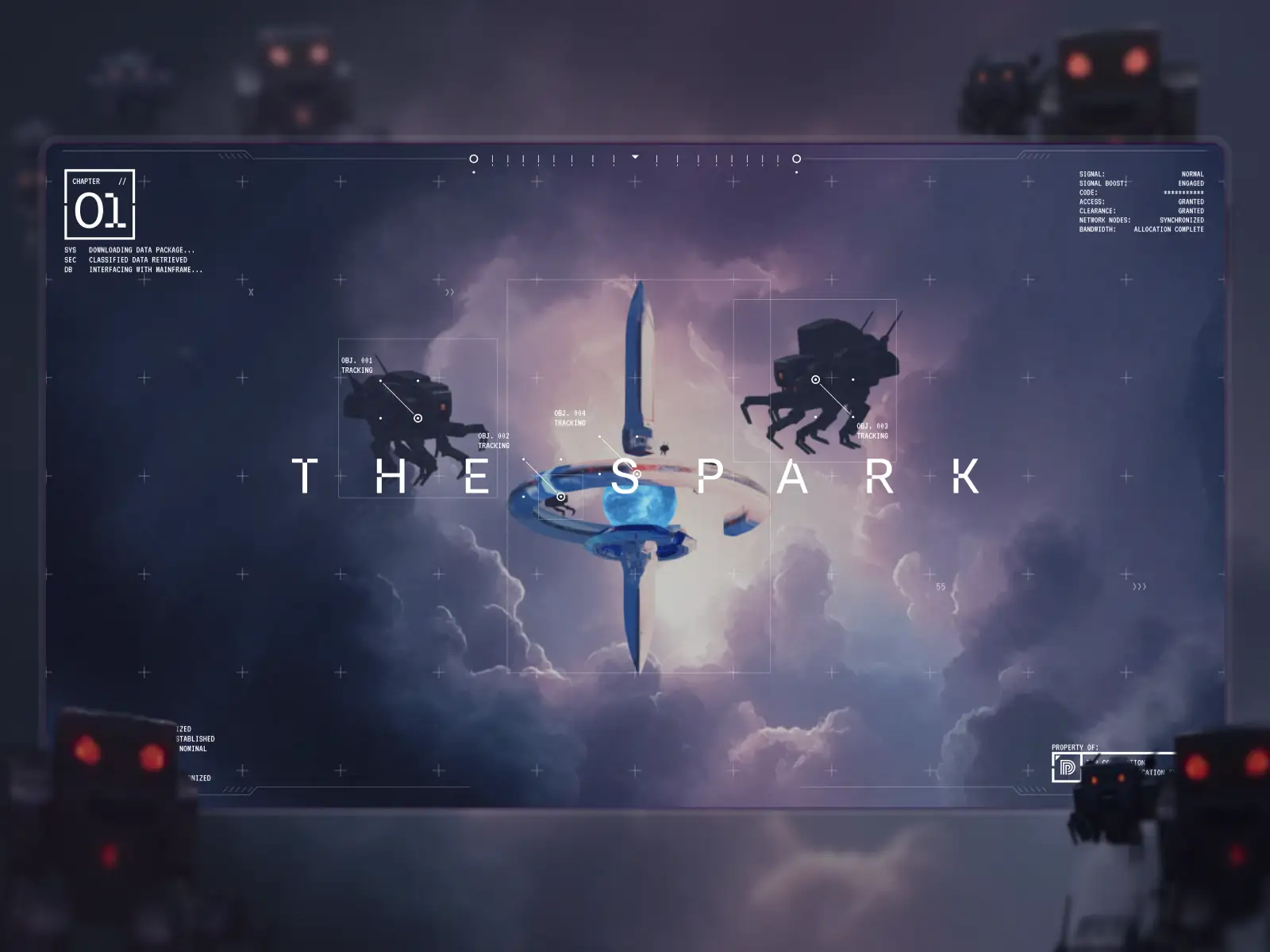
We’re an experience design partner for brands that love their customers. We create the digital moments that help them prove it, which often means designing the story and then engineering the system that makes it feel genuine: visuals, motion, pacing, sound and a real-time performant experience. The Spark is one of those internal builds where we pushed that approach all the way.

It started with a simple idea
We wanted a portfolio piece that behaves like a short film that happens to run in a browser, not a scrolling marketing page with some 3D sprinkled on top.
So we built a story about a spark of creativity on the loose in a city that is doing everything to prevent it from being set free. Scrolling drives the camera, wakes up characters, and pushes a tracking system that is always a few steps behind. The environment strains to contain the anomaly, then slowly begins to change around it.
The Spark is both a small journey and a look at how we handle new ideas inside our own work.
Where it began
The seed for this project was planted a few years back when we started talking about a new site. “Cyberpunk” was a recurring discussion, not as a skin or theme park overlay but as a mood that lined up with what we like to build. It connected to earlier brand experiments with futuristic pandas, old console UI, and the rhythm of side-scroller games.
From there we built a storyboard that felt like a complete arc: A spark appears, an automated system locks onto it, the tracking stack begins to glitch, and control fractures. The city that starts out cold and controlled gradually opens up and warms. At this stage, we ignored specific tools and engines on purpose and focused on the beats we wanted the runtime to support.
The end result was a narrative spine that could survive changes in tech. A spark to track, a system to fight it, and a city that reacts over time. The implementation details could move underneath that without breaking the story.


Building a world that actually runs
Running in a standard browser and feeling smooth on regular hardware was a non-negotiable. That single constraint drove almost every technical decision so that we were working together on an experience that doesn’t just look beautiful, but also doesn’t melt your GPU.
To create a robust and detailed world without a wall of geometry, we leaned on a familiar trick from game development. Detailed imagery is projected onto simple shapes, so the camera can travel and you still get depth and parallax. We then crafted textures that wrap light geometry instead of dense meshes.
Midjourney was useful in the early passes of that pipeline. Facades, signage, grime and general set dressing started as AI generations. Those outputs were then upscaled with tools like Magnific and Topaz Bloom to get cleaner base materials. This was still not ready to ship. In our experience, AI doesn’t do text or symbology well, so the team went over them manually. Labels were redrawn, graffiti was painted properly, nonsense characters were replaced with legible copy, and small Easter eggs were added. That human layer is what made the city feel legit instead of generated.
The vertical layout of the city also does some narrative work. Lower levels are warmer and more lived in. You see plants pushing through concrete, dense cables, older equipment and more visible wear. Higher up, the architecture gets cleaner, colder and more refined, closer to a corporate sky layer. That gradient is both visual and structural. It gives the spark a path to run and tells the story of how power and comfort are distributed in this world.


Character and motion
We started with very basic movement to test scroll pacing. Simple loops, a moving camera, and a rough sense of timing. Even at that stage those small tests changed the feel of the experience enough that it became obvious we needed to bring in a proper character animator.

Weight had to sit correctly, loops needed to feel natural, and the scroll-driven timing needed to be tight. The panda moves with intent, and the enforcement robots feel dangerous and tense without going into horror.
The short sequence where the hero meets the spark became our calibration point for the whole project. There is almost no copy in that scene, yet you understand the relationship and the stakes. That moment proved that body language and timing could carry more than another layer of on-screen explanation, so we pushed that idea through the rest of the runtime instead of falling back to text.
UI as a storytelling device
We wanted the story text to live inside the experience, not in a separate layer that sits next to it. That is why we skipped voiceover, lip sync and traditional subtitles and kept the script as on screen UI that reacts directly to what is happening. The interface behaves like another character in the world, not a neutral overlay.

There are two main UI modes that follow the story arc. At the beginning everything speaks with a cold system voice. Hard-edged panels, machine style type, tracking boxes and terminal-inspired details make it clear that an unseen stack is watching and logging movement. When the tracking fails and drops the spark, that failure is reflected in how the UI behaves. Elements misalign, lose reliability, and start to break away from the clean machine logic.

Once the spark begins to erode that control, the UI relaxes. Corners round out, a more human typeface replaces the digital one, and overlays pull back to reveal more of the world. You end up reading the same story through environment, characters and interface at the same time.
The motion on top of this is small but deliberate. Text appears with a typing rhythm, like a live feed. When the world shakes, UI elements jitter with it. Buttons pulse just enough to feel present without competing with the action. These short, sharp interactions keep the UI stitched into the story while letting the scenes stay in front.
Sound that reacts to you
Headphones add a lot of depth to The Spark because so much of the atmosphere is carried by sound. The visuals set the stage but the audio makes the city feel alive.
Ambient beds change as you move through altitude. High above the streets you hear wind and distant thunder. As you descend, the mix brings in rail noise, traffic, scanner beeps and more mechanical texture under that base layer. Some elements are wired directly to your actions. The train sound pans left to right as it crosses the frame. Footsteps scale with how aggressively you scroll and fade down when you pause.

The key detail is that these reactions are driven by scroll speed instead of only scroll position. That choice makes the sound feel connected to what you are doing in real-time, not just a pointer into a fixed timeline. You end up with an experience that behaves more like an instrument than a locked track.
The engine under the story
Under the hood, The Spark runs in cables.gl and talks to a Webflow frontend. The first prototype used raw mouse delta to drive motion. That felt wildly different across devices and browsers, so we switched to a dedicated scroll container in the DOM that every scene reads from. Each scene owns its own slice of the scroll range. Short beats compress their range to feel sharp. Longer beats get more space so you can look around.

To keep GPU load and memory in a sane range, only one scene is active at a time. When you reach the end of a scene, the next one begins to load. This approach allows us to quickly load the first scene (which matters if a visitor is ready to bounce after a blank intro). The short loaders between scenes are a tradeoff we accepted to support slower connections.
UI motion is built with Webflow Interactions and GSAP, but the triggers live in JavaScript. The scroll controller drives both the cables.gl side and the Webflow layer so they stay in sync. The script itself sits in JSON. As the user crosses specific progress markers, those JSON entries are rendered into UI elements and animated in. That split kept content manageable, versionable and easier to tweak without touching the underlying WebGL scene setup.
What worked, what we would change, and why we built it
We couldn’t be prouder of how The Spark landed. A few things stood out as clear wins.
Projection mapping gave us the depth and scale we wanted without heavy geometry. The CRT style interlace pass did more than expected with a small visual layer, tying the look together while softening aliasing when you move quickly. The two-state UI made the story easy to follow while keeping the amount of copy low. Making sound react to scroll speed instead of just position turned into one of the biggest wins for immersion.
We also ran into real limits. Mobile technically works, but it loses parallax and chops compositions that were framed for wide. We chose to gate phones to protect the first impression, especially after seeing a specific foldable WebGL bug snap our main character into a broken pose.
Mid-scene loading is still not ideal. It is less painful than a long initial wait, but the tradeoff is visible. In a future version we would likely expose a preload choice up front for people on fast connections. We would also push more asset loading into web workers to avoid any potential main thread stutter, and potentially work on a better animated vegetation system so the lower city feels even more alive.
Conclusion
At a high level, The Spark exists to show how much engineering and design thinking sits behind a polished end product. It is short, it runs in a browser, and it mixes art direction and technical decisions in a way you can feel.
Just as important, it gives us a platform for whatever comes next. The world and characters can evolve around the underlying engine. That is the real outcome for us: a small story that doubles as a test stack for more.
