
Project backstory
When Keith from Better Off® Studio approached us to do this project we were very hyped. What makes this project special for us is the fact that it’s a culture piece, not a commercial website that needs to hit quotas.
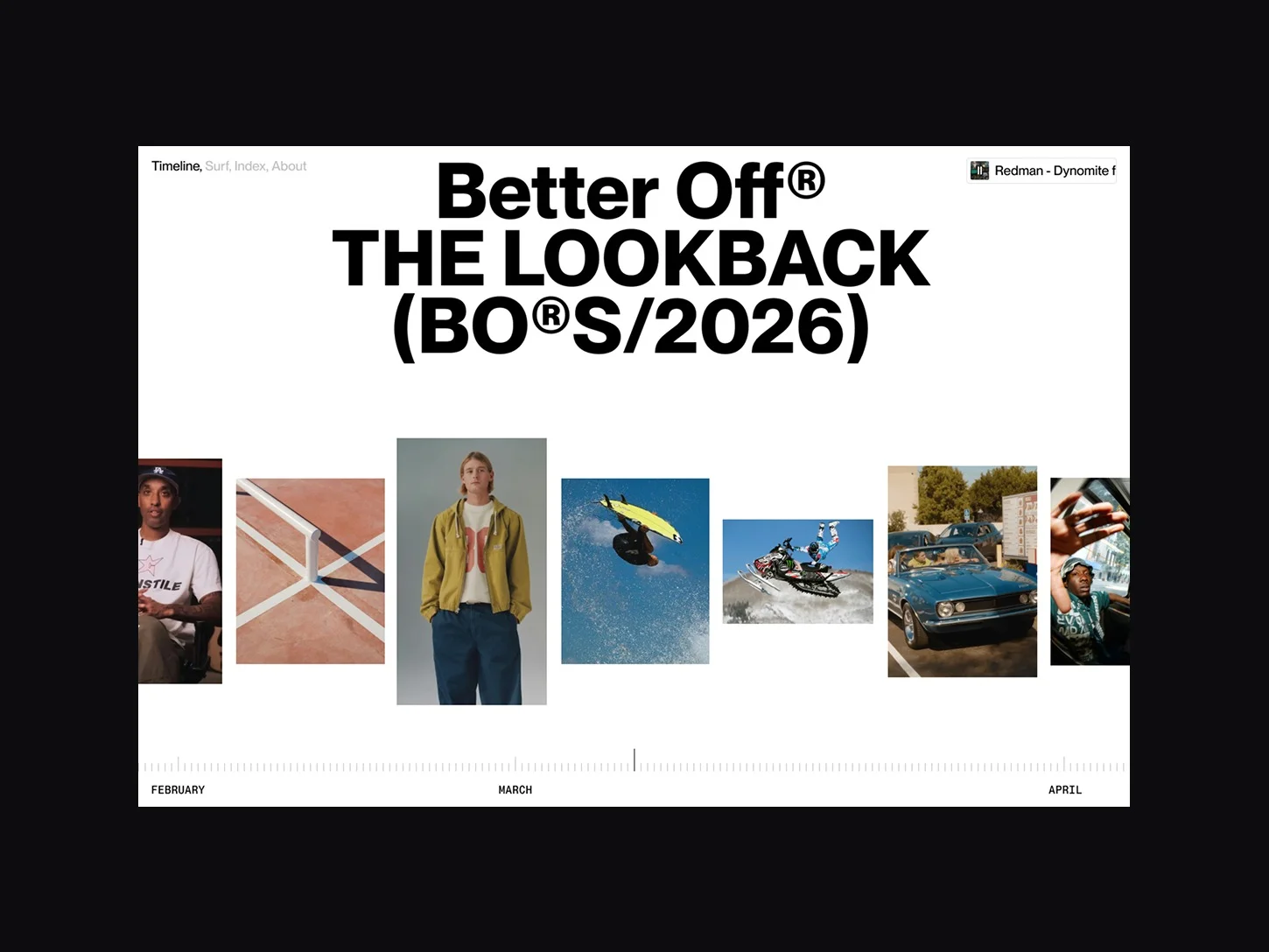
Not having to think about conversion rates and business goals and being able to focus solely on making this a creative experience was very liberating from a design perspective. Keith wanted some sort of culture capsule where the studio could document everything that inspired them and things they created themselves.
From a design perspective we wanted this to be scalable (needs to work with 20 pieces, but also with 200) and a fun experience. The fun part is important to keep users engaged and encourage them to explore the whole site. We started with a timeline as the main view where you can scroll back in time, an index view to easily navigate through the database of content and a fun about page to explain a bit about this passion project. Keith himself is pretty big on surfing in real life so as a surprise to him for trusting us with this project we created a surf view as well where the content mimics the waves of the ocean.
Tech stack & tools
Built with Nuxt 3 (Vue.js) for static generation and fast load times. Content comes from DatoCMS via GraphQL, keeping editorial and frontend fully separate.
Animations run on GSAP, page transitions, scroll effects, the interactive bits. Styling is Tailwind for layout and SCSS where more control was needed. State via Pinia, deployed on Netlify.
The page transitions
One of the more involved parts was the page transitions, specifically the image “flip” animations. When you navigate between pages, the images don’t just fade or cut, they physically move and scale from where they sat on the previous page to where they live on the next. This is powered by a custom flip function that records each image’s exact bounds before the route changes, then on the new page matches elements by ID, calculates the difference in position and scale between the two bounds, and animates from the old state to the new one using GSAP. Importantly, the calc function only considers elements that are actually visible in the viewport on both pages, so you never animate something the user couldn’t see.
The surf page added an extra layer of complexity, since the images are presented in a fake CSS 3D space, rotated and stacked in perspective. Flipping there required accounting for that transformed state before matching bounds, so the animations still read as natural even though the starting positions weren’t flat.
Different routes needed different logic, so there are several transition variants, carousel to article, article to article, to and from the about page, each with their own choreography.
Visual & interaction design
From a visual design we wanted the content to be the main driver, that’s why we chose a neutral white background for all the views when exploring content. There are three main views for this, the main timeline view, the surf view and the index view. To make sure there is a clear difference between these views and the about page, we made the about page black with white typography.
The design language is a blend between minimal simplicity and a bit of brutalism. We did this on purpose to let the content shine in the areas where it should, but still have a cultural edge on the about page and places where we have more typography.
The main hero, interaction wise, of the site is definitely the transitions between the content views, we wanted this to feel contextual and high-end. Instead of doing a simple fade in/out animation from one view to the other we chose a contextual animation that shows the content changing to the new view. Going from the main timeline to the index and from timeline to surf are my favourites.
For the timeline view we have the big type lockup at the top which gives you context (since it’s the first view you land on), for the other views we opted for a smaller version of the type lockup so the content has more room to shine, one of my favourite details is the animation between those 2 versions.
From a user experience view we also wanted the content to be easily explored. We had a great experience on the timeline, surf and index view but we don’t want people to have to go back to those views to explore further. We designed the detail view around this challenge, the view is designed in 2 main areas, on the right we have the scrollable content and on the left we have the active item, left and right to it there’s the next and previous item, users can intuitively use these to see more content without having to go back.
Besides these ‘hero’ animations we also defined a motion language for the whole site. We wanted everything to have a sense of context physically. That’s why you’ll see the images skew on the timeline and index view in relation to the scroll direction. Also the amount of ‘wave’ you get on the surf view is in relation to your scroll speed.
Architecture and structure
With a content-heavy website like this one that keeps growing as time goes on performance was one of the main things we kept in mind during the build of the site. The site only loads the content that’s seen by the users, same goes for animations between different views. If there’s 100 items on the site but only 7 in view, the animation only happens to those 7.
We also added a preloader to the site where the user has the option to enter the site with sound or without, here we also do some loading while the user makes the decision.
Another thing we needed to be mindful of when it comes to performance was hover effects, for example on the surf view we couldn’t use a hover effect that would fade out the not active items or have the image scale up or something. The main reason being when your cursor is on the content and you would be scrolling, that effect would be triggered multiple times per second. We came to a cool selection where the image peeps out like a book on a shelf. A good example of how a creative solution comes up when you need to think with boundaries.
When it comes to mobile, we wanted the site to be as light as possible, we removed everything audio-related and certain functionality to prioritise performance. By making this decision we were able to have the 3 main views also on mobile. So whatever medium you use to access the site, you get a full experience tailored to your device.
Page by page notes
- The intro: During the preloader we hint towards what type of content you’ll find on the site by showing the types of content that are being loaded.
- Timeline view: At the bottom we have the timeline UI, we wanted this to feel interactive, when you go down with your cursor, the lines start growing towards your cursor, inviting you to click and drag. We also added a wheel-of-fortune–like sound for the lines passing.
- Surf view: One of the strong suits is the infinite scroll, this is also on the timeline view. It allows the user to scroll in whatever direction from the start and it feels like there’s no end to the content.
- Index view: For content heavy websites, having an index view feels like a zoomed out view that makes coming back to content easier, it also allowed us to play with cool animations.
- About page: One of my favourite things is the contrast between the about page and the rest of the site, brutalist uppercase typography that works in harmony with the 3D logo that moves with you on scroll. Making this page with an infinite scroll is a hint towards the main content pages.
- Content detail page: Here I’m a big fan of the close button following your cursor on the left side.
- Music player: Across the whole site we have the music player, music is a big part of what can inspire us so we had to include a custom player for the site.
Reflections
Looking back on this project, we are very happy we were able to give the people over at Better Off® a home for everything they documented and created. It’s a true passion project built on experience, not only for the end user but also for the client itself. It’s been nothing but fun working on this, playing around with different ideas and animation concepts.
