
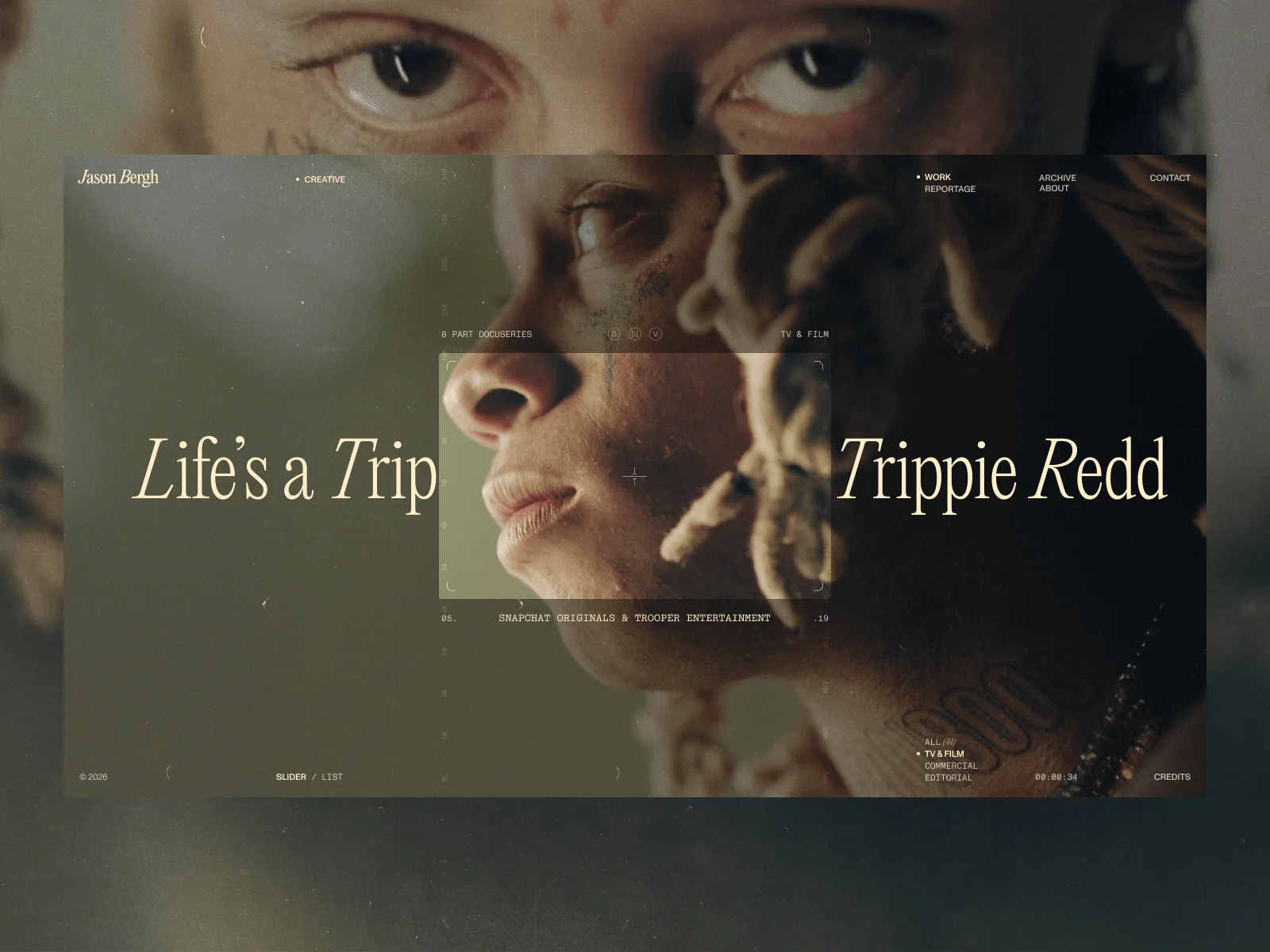
Let’s be honest: the world doesn’t need another “minimalist portfolio.” It needs a vibe.
When we sat down to build the digital home for director Jason Bergh, we made a pact: no boring grids, no generic transitions, and absolutely no “safe” choices. We wanted to build a presence—a cinematic statement about taste, rhythm, and the beauty of the pause. Here is how we translated Brooklyn grit and high-end luxury into a living, breathing web experience.
01. The Prologue: Storytelling from Second Zero
We don’t believe in “loading bars.” If a user has to wait, they should be entertained. The client’s brief was clear: hold their attention from the very first pixel.
We designed a Seamless Preloader that acts as the opening credits of the site. Using Barba.js, we bridged the gap between the initial load and the Index page. Instead of a jump, the user experience flows into the site like a slow zoom-in. We merged the Index and Works pages into one, placing Jason’s craft front and center. The moment the preloader finishes, you aren’t just “on a website”—you’ve already started the journey.
02. Visual DNA: The “Italic Rebellion”
Before we wrote a single line of code, we had to define the “scent” of the site. Jason’s work lives at the intersection of raw street culture and polished, high-end luxury. A standard white-background portfolio would have felt like putting a classic Mustang in a sterile showroom.
The Palette of a Darkroom
We ditched the standard #000000 for something with more gravity. Our primary background is #1e1e1e—it’s not just black; it’s the depth of a dark editing suite at 3 AM. We paired this with #FFEEC8 and #FFFBF2. These aren’t just “off-white” colors; they are creamy, organic tones that evoke aged film stock and the warmth of a studio spotlight.
Typography with a Pulse
For the headings, we chose PP Editorial, a font that carries an inherent elegance. But to prevent it from feeling too “precious,” we introduced what we call the Italic Rebellion. The first letter of every major heading is italicized. It’s a tiny, rhythmic gesture that suggests movement—like a frame that hasn’t quite settled into the projector yet. It gives the layout a soul and a sense of “planned imperfection” that mirrors Jason’s cinematic style.

03. The Analog Ghosts: Small Things with Great Meaning
The most iconic element of the UI is the Two Digital Lines with tracking numbers, running through every page. These lines are our tribute to the edges of a 35mm film strip.
They move in opposite directions, with their speed tied to the scroll inertia provided by Lenis. To make the site feel like one continuous take, we save the position of these lines in sessionStorage. When you navigate via Barba.js, the incoming page picks up these coordinates before the JavaScript even fully loads. The result is a perpetual motion machine; the lines never “reset,” they just keep flowing, regardless of what page you are on.
Waiting Mode: The Digital Pause
Inspired by the “DVD Player” bouncing logo and the aesthetic of old monitor glitches, Waiting Mode turns downtime into an experimental art piece. It’s a playful nod to the analog era, proving that even a “paused” state can be a stylistic choice.
04. Creative Mode: The Digital Concierge
We wanted the user to feel like they are part of the production process. To achieve this, we built two distinct “Modes” that change the entire UI behavior.
Creative Mode: The Director’s Lens
When you toggle Creative Mode, the site transforms into a professional monitor. We implemented a custom Viewfinder Mask that follows your cursor. As you move, you “reveal” the content through a camera’s eye. It adds a layer of tactile immersion that makes browsing feel like filming.
Luxury means taking care of the guest. Using the Network Information API, we built a concierge system that checks the user’s connection.
The Logic: If the API detects a slow connection or a “Data Saver” mode, the site scales back. It disables heavy preloads and simplifies animations to ensure that even on a weak signal, the experience remains premium, not frustrating.
function isConnectionFast() {
    const connection = navigator.connection || navigator.mozConnection || navigator.webkitConnection;
    if (!connection) return true;
    if (connection.saveData === true) return false;
    return connection.effectiveType === '4g'; // Only 4G gets the full Creative Mode
}
05. The Engineering War: Swiper vs. Virtual Scroll
This was our most significant technical battle. Jason’s work needs to be seen in two ways: a high-impact, cinematic Slider (for mood) and a functional, fast List (for deep-diving into the archive).
The Swiper (Slider) is DOM-heavy, holding all slides at once. The Virtual Scroll (List), powered by Lenis, creates and destroys elements on the fly for performance. Synchronizing these two was a nightmare that required a custom state management system.
The Handshake: To make the switch between Slider and List modes invisible to the user, we used a Chain of Promises:
- Fade Out: Current mode elements animate out.
- Rebuild: The DOM is silently rebuilt, mapping Slider indices to List templates.
- Fade In: The new mode appears. To “glue” this transition, a background video plays continuously, ensuring there’s never a moment of static silence.
06. The “Grown” Player: Surgical Precision
The transition from a thumbnail to a full-screen video is the most critical moment for a director’s site. We ditched standard embeds for a custom-built engine using Glightbox as a base.
When you click a project in the List, the player grows from the exact spot you clicked.
- The Problem: In a virtualized list, the project you just clicked might literally disappear from the DOM while the player is opening.
- The Solution: We capture the bounding box (
getBoundingClientRect) the millisecond the click happens and store the coordinates in CSS variables. - The Return: When you close the player, the system first scrolls the list back to the correct project, recalculates its new position, and only then performs the “shrink” animation back into the thumbnail. It’s surgical, seamless, and entirely custom.
07. The Archive: The “Echo Effect”
Directors often have legendary “Archive” footage shots that weren’t filmed in 4K. Showing a low-res video on a 27-inch Retina display usually looks like a mistake. We decided to make it a feature.
The Echo Effect: Instead of one blurry video, we display four small, synchronized instances of the same clip.
- In the Slider, they act as a rhythmic accent.
- In the List, they function as a multipane background texture. By repeating the footage, we mask the lower resolution and create a high-energy, “surveillance-style” aesthetic that fits perfectly with the Brooklyn grit vibe.
08. The Audio Bio: Reading with your Ears
The “About” page is usually where users stop engaging. We wanted to turn Jason’s biography into an immersive experience.
Using SplitType, we broke the text into individual lines and assigned a CSS variable --fill. We recorded a voice-over of the bio and used requestAnimationFrame to sync the text filling with the audio playback. As you listen, the text “lights up” line by line. It’s a “hands-free” way to get to know the director while staying fully immersed in the site’s atmosphere.
09. The “Happy Accident”: Serendipity in the Slider
In the “Global Shoot Destinations” section, we tried to port a complex clip-path reveal animation from the homepage. Because of the asymmetric layout, the animation directions clashed in a way we didn’t predict.
The images revealed themselves in a “jittery” way that looked exactly like a camera shutter misfiring or a film reel getting caught in a projector. It felt raw, human, and perfectly in line with Jason’s “Grit” aesthetic. We didn’t “fix” it—we spent three days polishing that “error” until it became one of our favorite features on the site.
10. Mobile: The Art of the Timing
Translating a cinematic “heavy” experience to mobile is always a risk. You can’t just copy-paste. We had to rethink the Cadence:
- The Timing: On desktop, a 0.6s transition feels “luxurious.” On a thumb-swipe, it feels “laggy.” We shortened all mobile transitions to 0.3s.
- The Stagger: We reduced the delay between appearing elements to 0.05s. It’s faster, but it still maintains the “orchestrated” feel.
- Optimization: We removed the heavy Viewfinder masks on mobile to save GPU cycles, focusing instead on snappy, responsive content delivery.

11. The 404: The Big Idea Never Ends
Even the 404 page is a directed scene. We used Unicorn Studio to create a WebGL experience that carries over the movement of the analog lines. We didn’t want a “Page Not Found” message to break the spell. In our world, even an error is treated with the same cinematic care as the homepage. It’s a reminder that even when you’re lost, the story continues.
The Final Frame
Jason Bergh’s site is an invitation to stop scrolling and start feeling. It’s a place where “Happy Accidents” are welcomed, where the audio narrates the journey, and where technology doesn’t stand in front of the art—it becomes the lens through which you see it.
Now, stop reading, go watch some films, and for heaven’s sake—stay creative.

Stack Under the Hood
- Webflow: Base platform and CMS.
- GSAP: The undisputed muscle (ScrollTrigger, Observer, Draggable, InertiaPlugin).
- Barba.js: The magic glue for seamless transitions.
- Embla.js: The engine for smooth sliders.
- Lenis: For that buttery, tactile custom scroll experience.
- Glightbox: Our cinematic lens for high-fidelity playback.
