
Hi, my name is Houmahani Kane. I’m a creative front-end developer based in Paris, France.
This demo started as an experiment: can scroll feel like time passing? An earlier version was a cosmic trail drifting from dusk to night. You can see it here. For Codrops, I reworked the idea into something more editorial: a gallery that designers and art directors could connect with as much as developers.
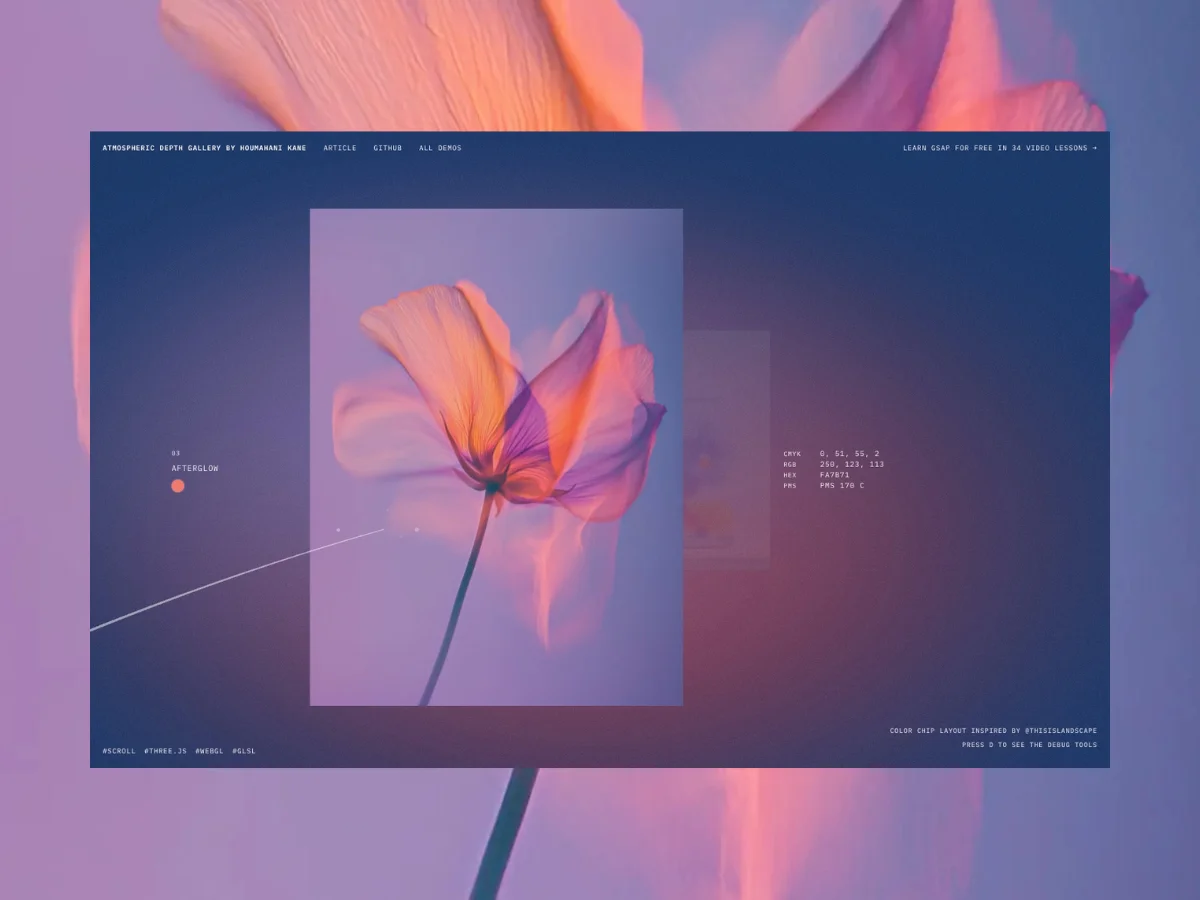
What we’re building is a depth-based gallery: images stacked along the Z-axis, each carrying its own color palette that shifts the background as you move through them. I wanted it to be less like a slideshow and more like a walk through a mood. You can reuse this pattern for product collections, campaigns, materials, or any series of images you want to turn into a small story.
Concept
The whole system is based on three ideas. Independently they’re simple but together they’re what makes the gallery feel like a mood rather than a layout.
- Depth: each image lives on its own Z-layer instead of a flat carousel.
- Mood: every image defines a palette that drives the background gradient.
- Motion: scroll speed becomes a reusable signal that can subtly lift or calm the scene and guide you through it.
The code snippets assume familiarity with Three.js and GLSL, but the concepts and approach are for everyone. I’m using Vite with Three.js and plain JavaScript. Snippets are simplified for clarity, please refer to the source code for full implementation.
The foundation
Goal: get a single plane rendering on screen.
Before any mood or motion, there’s just a blank canvas. This step is about making the scene exist with one plane, one camera, one render loop. Everything else comes on top of this.
I work in a class-based structure where each file has a single responsibility and stays under a few hundred lines so it stays consistent, readable, and kind to future me.
src
 ┣ Experience
 ┃ ┣ Background/
 ┃ ┣ Engine.js
 ┃ ┣ Gallery.js
 ┃ ┣ Scroll.js
 ┃ ┗ index.js
 ┣ data/
 ┗ main.js
Engine owns the scene, Gallery owns the planes, Scroll owns the camera movement, Background owns the mood.
Into the depth
Goal: scroll through planes stacked in 3D space.
This is where the gallery stops being flat and starts feeling spatial, like you’re actually moving through something rather than swiping past it. No images yet, just the architecture of depth.
Placing the planes
We start simple: 6 placeholder planes, flat colors, correct spacing. We get the structure right before adding any other complexity.
const planeGap = 2.5 // distance between each plane in world space

planes.forEach((plane, index) => {
	plane.position.set(
	planePositions[index].x, // horizontal composition from galleryData
	0,                       // y — vertically centered
	-index * planeGap        // z — pushes each plane deeper into the scene
	)
})- Negative Z pushes each plane deeper into the scene.
- planeGap controls the spacing.
- X positions come from
galleryDataso the composition stays intentional.

Scroll drives the camera
This is what makes the gallery feel responsive. Scroll input becomes camera movement through Z space. The smoother this feels, the more the gallery feels like a physical space you’re moving through.
The key is separating what the user does from what the camera does. Raw scroll input is messy, so we smooth it before applying it.
scrollTarget     += wheelDelta        // raw input from wheel/touch
scrollCurrent     = lerp(scrollCurrent, scrollTarget, scrollSmoothing) // smoothed value
camera.position.z = cameraStartZ - scrollCurrent * scrollToWorldFactor // camera moves in depthscrollSmoothingcontrols how lazily the camera follows. The closer to 0, the more cinematic it feels.scrollToWorldFactorconverts pixel scroll input into 3D world movement. Without it, the camera would travel way too far.
Adding bounds
Without bounds, the camera drifts past the last plane into empty space. This step keeps the experience contained. The gallery has a beginning and an end.
// get the Z range of all planes
const { nearestZ, deepestZ } = this.gallery.getDepthRange()

// convert depth range to scroll limits
const minScroll = this.scrollFromCameraZ(nearestZ + this.firstPlaneViewOffset)
const maxScroll = this.scrollFromCameraZ(deepestZ + this.lastPlaneViewOffset)

// clamp both — clamping only one would let smoothing overshoot
this.scrollTarget  = THREE.MathUtils.clamp(this.scrollTarget,  minScroll, maxScroll)
this.scrollCurrent = THREE.MathUtils.clamp(this.scrollCurrent, minScroll, maxScroll)getDepthRange()reads all plane Z positions. We can add or remove images and bounds update automatically.- We clamp both
scrollTargetandscrollCurrent. Clamping only one would let the camera briefly drift past the boundary. firstPlaneViewOffsetandlastPlaneViewOffsetkeep a small distance so the camera never enters the planes
Making it feel alive
Goal: measure how fast the user is moving through the gallery, not just where they are.
Right now the scene doesn’t react to how you move through it. It reacts the same way whether you scroll slowly or rush through it. This step captures how fast or slow the user is scrolling and turns it into a signal we’ll reuse everywhere: background, motion, breath. It’s what makes the whole thing feel like it’s responding to you.
Before wiring it to anything visual, I built the debug visualizer first. At this stage velocity has no visual output yet, so without the bar we’re tweaking the values blind.
Press D on the demo to see the debug tools
Conceptually:
- Fast scroll → high velocity
- Slow scroll / stop → velocity smoothly goes back to zero
// delta between this frame and last = raw speed
this.rawVelocity = this.scrollCurrent - this.previousScrollCurrent

// smooth it so it doesn't flicker frame to frame
this.velocity = THREE.MathUtils.lerp(this.velocity, this.rawVelocity, this.velocityDamping)

// keep it in a safe range
this.velocity = THREE.MathUtils.clamp(this.velocity, -this.velocityMax, this.velocityMax)

// resets to exactly 0 when the user stops — avoids tiny unwanted flickering
if (Math.abs(this.velocity) < this.velocityStopThreshold) this.velocity = 0
update() {
// scroll smoothing + clamping...
this.updateVelocity()
this.updateVelocityVisualizer() // remove in production
// camera update...
}What each part does:
rawVelocityis the difference between this frame and the last.velocityDampingcontrols how long the “breath” lasts after the user stops.- The threshold resets velocity to exactly 0 when the user stops. It avoids tiny unwanted flickering.
The mood system
Goal: real images, background colors shifting with them, atmosphere that responds to movement.
This is where the gallery starts feeling intentional. Up until now, it was spatial but cold. This step is what makes it feel like a mood.
Swapping in real images
We replace flat colors with real images. The gallery data looks like this:
export const galleryData = [
  {
    textureSrc: '/image-01.jpg',
    position: { x: -1.2 },
    mood: {
      background: '#fbe8cd',    // background color
      blob1: '#ffd56d', // first atmosphere blob
      blob2: '#5d816a', // second atmosphere blob
    },
  },
]- Each image carries its own mood palette. Three colors that will drive the entire background.
- Plane size follows the image aspect ratio, so nothing looks stretched.
Mood per image and blend by depth
The velocity signal we captured in the previous section now has its first job: driving the background. As you move through depth, the atmosphere shifts from one image’s palette to the next. No hard cuts, just a continuous blend.
this.backgroundColor
  .set(currentMood.background)
  .lerp(this.nextBackgroundColor.set(nextMood.background), blend)

this.blob1Color
  .set(currentMood.blob1)
.lerp(this.nextBlob1Color.set(nextMood.blob1), blend)blendis a 0 to 1 value computed from camera position between two planes.- Every frame the background interpolates between the current and next image’s palette.
Shader background
The fragment shader is where the magic happens. Think of it as a painter’s palette. Every pixel on screen passes through it, and we decide its final color: background, blobs, grain, brightness response. All of it lives here.
The shader is intentionally minimal. I tried more complex systems like top/mid/bottom colors, extra accents, but they were harder to debug and unnecessary. GLSL is already complex enough.
Two blobs, one background color, a touch of film grain. It doesn’t need more than that.
// 1. flat background
vec3 color = uBgColor;

// 2. two soft blobs
float blob1 = smoothstep(uBlobRadius, 0.0, distance(vUv, blob1Center)); // positions animated with uTime
float blob2 = smoothstep(uBlobRadiusSecondary, 0.0, distance(vUv, blob2Center)); // positions animated with uTime

// 3. blend blobs into background
vec3 blob1SoftColor = mix(uBlob1Color, uBgColor, 0.35);
vec3 blob2SoftColor = mix(uBlob2Color, uBgColor, 0.35);
color = mix(color, blob1SoftColor, blob1 * uBlobStrength);
color = mix(color, blob2SoftColor, blob2 * uBlobStrength);

// 4. velocity lifts brightness slightly on fast scroll
color += uVelocityIntensity * 0.10;

// 5. film grain for texture
float grain = random(vUv * vec2(1387.13, 947.91)) - 0.5;
color += grain * uNoiseStrength;

gl_FragColor = vec4(color, 1.0);
The finishing touches
Goal: layer in editorial text, micro-motion driven by velocity, and a trail that moves like wind through the gallery.
This final layer is what makes the demo feel usable rather than purely technical. It could be a product campaign, a material collection, a visual archive. The structure is already there.
Adding an editorial label layer
A gallery of images is a portfolio. Images with text, color data, and intentional composition is a story. That’s the difference this layer makes.
The color chip, showing Hex, RGB, CMYK and PMS values, was inspired by an Instagram post by @thisislandscape that I kept coming back to. It felt like the kind of detail that speaks to designers and art directors. Full credit to them.
Designers can swap this layer for whatever information feels meaningful: a product name, a campaign chapter, a material reference. The system doesn’t care.
label: {
  word: 'violet',
  line: 'pressed bloom',
  pms: 'PMS 7585 C',
  color: '#2e2e2e',
},
Depth was already driving the planes and the mood, so it made sense for the text to follow the same progression. Everything answers to the same value, which is what makes the system feel coherent rather than assembled.
Motion and breath
We have three layers of micro-motion, each driven by a different signal:
- Mouse position creates a subtle X/Y parallax on each plane, a quiet reminder that you’re in a 3D space.
- Scroll drift is my favourite detail. As you swipe up on a trackpad or scroll with a mouse, the planes drift upward with you like they have weight. As if they’re responding to your touch. Swipe down, they follow. Stop, they lazily float back to center. It works best on a trackpad and gives the whole thing a physical, tactile quality.
- Scroll speed drives a breath. The faster you scroll, the more the planes tilt toward your cursor and pulse slightly in scale. At rest: flat and still. During fast scroll: tilted and alive.
In short: parallax = where your mouse is, scroll drift = which direction you’re scrolling, breath = how fast.
// 1. parallax — mouse position shifts planes
// parallaxInfluence: deeper planes shift more (opacity * depth factor)
plane.position.x = xPosition + pointerX * parallaxAmount * parallaxInfluence
plane.position.y = yPosition + pointerY * parallaxAmount * parallaxInfluence

// 2. scroll drift — planes follow your gesture direction
driftTarget = scrollDrift // -1 to +1
plane.position.y += driftCurrent * driftAmount

// 3. breath — scroll speed tilts and pulses planes
plane.rotation.x = pointerY * breathTilt * breathIntensity
scalePulse = 1 + breathScale * breathIntensity
The trail
With the depth, the mood shifts and the motion already in place, I felt the scene was complete. Adding more risked breaking the experience.
In my original cosmic experience, I did have a trail guiding the user. So I pushed myself to find a version that felt right for this editorial version. Something that moves like wind through the gallery of flowers, tracing elegant curves as you scroll, guiding you forward without demanding too much attention.
Three things work together:
The path driven by scroll progress:
// the trail winds across screen space as you scroll through the gallery
x = sin(progress × 2π × horizontalCycles) × width  // left/right oscillation
y = sin(progress × 2π × verticalCycles) × verticalAmplitude  // up/down oscillation
z = cameraZ + distanceAhead  // always ahead of the camera
The curve where points are passed into a Three.js Catmull-Rom spline for smooth interpolation:
// 'centripetal' is the Three.js curve type that handles sharp turns best
const curve = new THREE.CatmullRomCurve3(points, false, 'centripetal')
const sampled = curve.getSpacedPoints(segments) // evenly spaced points along the curve
The geometry, a tube rebuilt every frame, fat at the head and getting thinner toward the tail:
// t goes from 0 (head) to 1 (tail)
// power curve makes the taper feel natural rather than linear
radius = radiusHead + (radiusTail - radiusHead) * Math.pow(t, 1.5)
I have added sparkle particles at the head to complete the effect. The math here was complex so I leaned on AI to work through parts of it.
Go further
Here are a few directions you can explore from here:
- Change the flower images for product collections, campaign chapters, archives, or materials. The depth and mood system doesn’t care what the images are. It just needs a palette per image. That’s it.
- Velocity is the signal I’m most excited to push further. We barely scratched the surface here. We could have distortion on the planes, depth-of-field shifts, light flares on fast scroll. There’s a lot of room.
- And audio. A soundscape that reacts to depth and motion would take the immersion to a completely different level. That one’s on my list.
Conclusion
At this point everything is connected: depth drives the planes, the mood, and the text. Velocity makes the scene breathe. The background blends seamlessly between atmospheres as you move.
The result feels smooth and cohesive. Everything serves the same idea: making scroll feel like something you experience, not just something you do.
