
The Brief
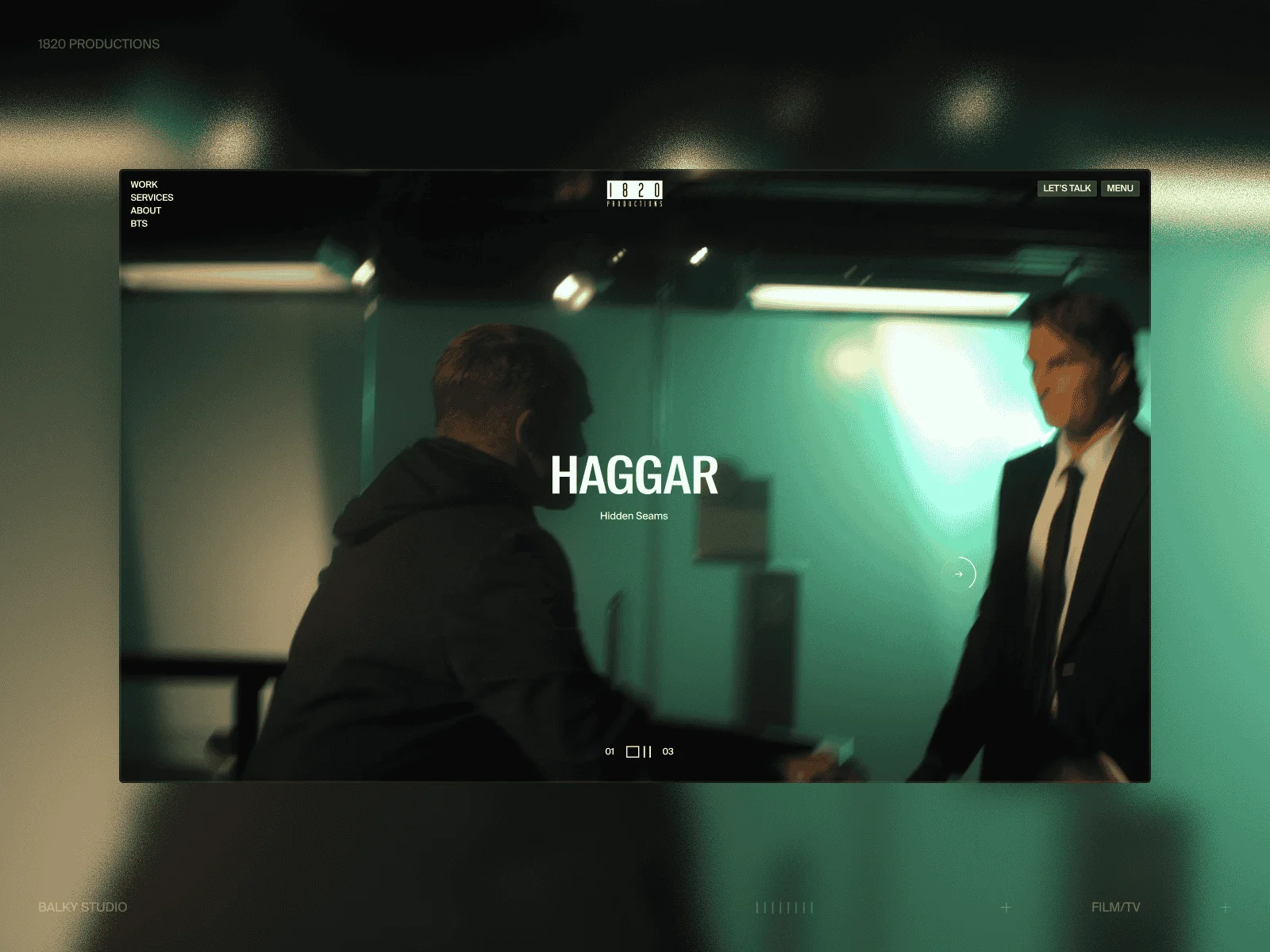
1820 Productions isn’t your average video production company. They’ve worked with Toyota, 7-Eleven, Megan Thee Stallion, and networks like ABC, CBS, and BET. When they came to us at Balky Studio, the brief was deceptively simple: a new website that sells the quality of their work.
The only stipulation? Keep it minimal. Keep it simple.
That constraint turned out to be the most interesting part of the project. How do you make something feel high quality and engaging when you’re deliberately stripping away visual complexity? The answer, for us, was motion. Every interaction, every transition, every hover state became an opportunity to add craft without adding clutter.
Design Direction and Visual Language
(by Williams Alamu)
At the start of the project, the client gave creative freedom, with a sense of what they really wanted. This helped us move fast. We explored several directions and shared early concepts. They were quick and specific with the feedback they gave over some of the concepts.
From those reviews, they wanted a website that is minimal but with uniqueness. We decided on playing into bold headlines, small supporting text, and fluid motion. The goal was simple. Remove anything unnecessary. Keep only what could serve as a strong identity for the project and then amplify it across all pages.
Minimalism
The design embraces a minimalist yet bold almost strictly monochromatic, with a structured typographic system (very few font sizes). The layout is intentionally clean, but the scroll animations and small interactions add movement and keep the experience engaging and fluid.
Typography & Color system
The brand did not start with a defined identity system. We had to define the website branding from scratch while respecting the existing logo concept. Since the existing logo used a condensed typeface, we searched for a similar condensed family and paired it with a nice-looking sans serif.
The site copy was minimal, so the work needed to speak through structure and hierarchy. We tested many layout and type combinations to understand how each pairing could look across different pages.
For color, we stripped away from the possibility of having so many color combination early. We choose a black and white system to keep attention on form, spacing, and motion.

Visuals
All visuals across the site came from the client’s projects. The client decided against external imagery as they had all we could possible need when it came to imagery. Those works themself became the visual language.
Motion as a Core Design Material
We treated motion as a core design element, not decoration. Motion reinforced structure, pacing, and brand character. We made early tests in Figma and more complex sequences were moved to Jitter.
Showing motion prototypes helped us explain ideas faster than static frames.
Here are a few of the motion highlights:
- Line animations: We used lines as section markers. They introduce new sections and set rhythm for the page.
- Image parallax: Vertical and horizontal scroll both trigger parallax on featured images. This adds depth without distracting from content.
- Fluid transitions: Transitions feel closer to editorial cuts than standard fades. Hover states react fast and clearly. Page changes and project navigation keep the same tempo and logic.
Tech Stack
Before diving into specifics, here’s what we were working with:
The Foundation: Webflow-Dev-Setup
Before we get into specific features, it’s worth explaining what’s running underneath. Federico Valla’s Webflow-Dev-Setup has become the backbone of every project we build at Balky. It solves a common scaling challenge: Webflow is great for layout and CMS, but the moment you add complex custom JavaScript (especially with page transitions), it helps to bring more structure to how code is organized.
The setup gives you a proper module system. Any element with a data-module attribute automatically gets discovered and initialized:
...
...
// src/modules/cursor.ts
export default function (element: HTMLElement, dataset: DOMStringMap) {
  // Your component code here
  // dataset contains any data-* attributes from the element
}
The real power is in the lifecycle hooks. Each module gets access to:
onMount— runs when the component initializesonDestroy— runs when the component is torn down (page transition, removal)onPageIn— runs when a new page animates inonPageOut— runs when the current page animates out
import { onMount, onDestroy, onPageIn, onPageOut } from "@/modules/_";

export default function (element: HTMLElement) {
  let animation: gsap.core.Tween;

  onMount(() => {
    // Setup: add event listeners, start animations
    animation = gsap.to(element, { rotation: 360, repeat: -1 });
  });

  onPageIn(async () => {
    // Animate element in when page loads
    await gsap.fromTo(element, { opacity: 0 }, { opacity: 1 });
  });

  onPageOut(async () => {
    // Animate element out before page transition
    await gsap.to(element, { opacity: 0 });
  });

  onDestroy(() => {
    // Cleanup: remove listeners, kill animations
    animation?.kill();
  });
}
This matters because of page transitions. When you navigate with Taxi.js, the old page’s DOM gets removed but any JavaScript attached to those elements keeps running unless you explicitly clean it up. Event listeners pile up. GSAP tweens target elements that no longer exist. Memory leaks accumulate.
The module system handles this automatically. When a page transitions out, onDestroy fires for every module on that page. When the new page loads, modules are discovered and onMount fires. You write your component once, and the lifecycle is managed for you.
It also integrates Lenis for smooth scroll, has a subscription system for RAF and resize events, and handles Webflow editor detection so your animations play nicely in the Designer. But the lifecycle management is what makes ambitious projects like 1820 possible because we can have morphing cursors, parallax effects, and complex loaders without worrying about zombie code haunting us after navigation.
Session-Aware Loading
We wanted the loader experience to feel intentional. First-time visitors get the full branded intro; returning visitors get something snappier. The trick is simple, a lightweight session controller that checks sessionStorage on init.
class _SessionController {
  private isFirstSession: boolean;

  constructor() {
    const firstSession = sessionStorage.getItem("firstSession");
    if (!firstSession) {
      this.isFirstSession = true;
      sessionStorage.setItem("firstSession", "true");
    } else {
      this.isFirstSession = false;
    }
  }

  get firstSession(): boolean {
    return this.isFirstSession;
  }
}

export const SessionController = new _SessionController();
Then in the loader, we branch:
if (SessionController.firstSession) {
  runFullIntro();
} else {
  runQuickLoader();
}
Nothing fancy but it makes the difference between a site that feels considered vs. one that plays the same animation every time.
The Loader Animation
The loader runs two GSAP timelines in parallel, one for animating content in (icons spin up, brand slides in), one for animating it out and revealing the page underneath.
// Content IN — icons and brand animate in
const contentTl = gsap.timeline({ paused: true });

contentTl.fromTo(loaderIcons,
  { scale: 0, rotate: 270, opacity: 0 },
  { scale: 1, rotate: 0, opacity: 1, ease: "expo.out", duration: 1.5, stagger: 0.08 }
);

contentTl.to(loaderBrand,
  { y: "0%", opacity: 1, ease: "expo.out", duration: 1.4 },
  "<"
);

// Content OUT — progress bar + clip-path reveal
const outTl = gsap.timeline({ paused: true });

outTl.to(loaderProgress, {
  scaleX: 1,
  duration: 1.5,
  ease: "expo.inOut",
  onComplete: () => {
    gsap.to(loaderProgress, { x: "100%", scaleX: 0.5, duration: 1, ease: "expo.inOut" });
  },
});

outTl.to(loaderMain, {
  clipPath: "inset(0% 0% 100% 0%)",
  duration: 1,
  ease: "expo.inOut",
}, "<");
The progress bar doesn’t just fill and disappear, it overshoots slightly, sliding off to the right as it shrinks. Small detail, but it makes the whole thing feel more fluid.
Page Transitions: The Cleanup Problem
Page transition libraries like Barba.js and Taxi.js make SPA-style navigation easy, but they each have tradeoffs. We went with Taxi.js for its simplicity, but ran into a challenge: we wanted both the outgoing and incoming pages visible simultaneously so we could animate one over the other.
Taxi has a removeOldContent: false option for exactly this but it does mean you need a clear cleanup strategy. Leave the old page in the DOM and you’ve got memory leaks. Destroy components too early and you get flashes of unstyled content.
const PAGES_CONFIG = {
  removeOldContent: false,
  allowInterruption: false,
};
Freezing the Old Page
The trick is freezing the old page exactly where it is. When the user clicks a link, we capture the current scroll position, switch the outgoing page to position: absolute, and offset it by the scroll amount. This keeps it visually locked in place while the new page loads underneath.
Special shout out to Web Engineer Seyi Oluwadare who spent sometime with me working out this logic.
async onLeave({ from, done }) {
  const fromInner = from.querySelector(".page_view_inner");
  const scrollPosition = Scroll.currentScroll;

  // Store reference for cleanup later
  this.oldContainer = from;

  // Freeze the old page in place
  gsap.set(from, {
    position: "absolute",
    top: 0,
    left: 0,
    width: "100%",
    zIndex: 2,
  });

  // Offset inner content by scroll position so it doesn't jump
  gsap.set(fromInner, {
    position: "absolute",
    top: -scrollPosition,
  });

  Scroll.stop();

  // Store cleanup for later — don't run it yet
  this.pendingCleanup = { from };
  done();
}
The Reveal + Deferred Cleanup
In onEnter, we run the actual transition animation with a subtle upward drift with an overlay fade, then the clip-path reveal. The important part is when cleanup happens: we wait for both the animation to complete and the new page to fully initialize before removing the old DOM.
async onEnter({ to, done }) {
  Scroll.start();
  Scroll.toTop();

  // Initialize new page components
  const transitionInPromise = App.pages.transitionIn({ to });

  // Animate the old page out
  const transTl = gsap.timeline();

  transTl.to(oldPageOverlay, { opacity: 1, duration: 1.1, ease: "expo.inOut" });
  transTl.to(oldPageInner, { y: -125, duration: 1.1, ease: "expo.inOut" }, "<");
  transTl.to(this.oldContainer, {
    clipPath: "inset(0% 0% 100%)",
    duration: 1,
    ease: "expo.inOut",
    onComplete: () => {
      // Wait for new page to be ready, THEN clean up
      transitionInPromise.then(() => {
        App.pages.transitionOut(this.pendingCleanup);
        this.oldContainer.parentNode.removeChild(this.oldContainer);
        this.oldContainer = null;
      });
    },
  }, "<");

  done();
}
The key insight is sequencing: the animation runs, then we wait for the new page’s components to fully mount, then we destroy the old page’s components and remove it from the DOM. The user never sees a broken intermediate state.
Custom Cursor: SVG Morphing That Survives Navigation
We wanted a cursor that could transform between states, a dot by default, play/pause icons over video, arrows for sliders. GSAP’s MorphSVGPlugin handles the shape tweening, but the real challenge was making it work reliably in an SPA where elements are constantly being created and destroyed.
Caching Path Data
Custom cursors with SVG morphing can get expensive if you’re querying the DOM on every hover. We cache all the path data upfront so morphing is just a matter of swapping strings.
gsap.registerPlugin(MorphSVGPlugin);

const pathCache: { [key: string]: string } = {};

const extractPathData = () => {
  const icons = {
    default: element.querySelector('[data-cursor-svg="dot"]'),
    play: element.querySelector('[data-cursor-svg="play"]'),
    pause: element.querySelector('[data-cursor-svg="pause"]'),
    next: element.querySelector('[data-cursor-svg="right-arrow"]'),
    prev: element.querySelector('[data-cursor-svg="left-arrow"]'),
  };

  Object.entries(icons).forEach(([key, icon]) => {
    const path = icon?.querySelector("path");
    if (path) {
      pathCache[key] = path.getAttribute("d") || "";
    }
  });
};

extractPathData();
The Morph Function
With paths cached, the actual morph is straightforward, we kill any in-progress animation, then tween to the new shape.
let currentMorphAnimation: gsap.core.Tween | null = null;
let currentShape = "default";

const morphToShape = (targetShape: string) => {
  if (currentShape === targetShape) return;

  if (currentMorphAnimation) {
    currentMorphAnimation.kill();
  }

  currentShape = targetShape;

  currentMorphAnimation = gsap.to(cursorPath, {
    morphSVG: {
      shape: pathCache[targetShape],
      type: "rotational",
    },
    duration: 0.5,
    ease: "expo.out",
  });
};
Layered Movement
The cursor is actually three elements moving at different speeds, the icon follows fast, the circle follows slower, and a label trails behind. This layering creates a sense of weight.
const ease0 = 0.15; // icon — fast
const ease1 = 0.08; // circle — medium
const ease2 = 0.05; // label — slow

let smoothX0 = 0, smoothY0 = 0;
let smoothX1 = 0, smoothY1 = 0;
let smoothX2 = 0, smoothY2 = 0;

const handleRaf = () => {
  smoothX0 += (Mouse.x - smoothX0) * ease0;
  smoothY0 += (Mouse.y - smoothY0) * ease0;

  smoothX1 += (Mouse.x - smoothX1) * ease1;
  smoothY1 += (Mouse.y - smoothY1) * ease1;

  smoothX2 += (Mouse.x - smoothX2) * ease2;
  smoothY2 += (Mouse.y - smoothY2) * ease2;

  cursorIcon.style.transform = `translate(${smoothX0}px, ${smoothY0}px)`;
  cursorCircle.style.transform = `translate(${smoothX1}px, ${smoothY1}px)`;
  cursorLabel.style.transform = `translate(${smoothX2}px, ${smoothY2}px)`;
};
Event Delegation for SPAs
Since we’re using page transitions, elements get destroyed and recreated constantly. Instead of attaching listeners to each trigger element and cleaning them up on every navigation, we use document-level event delegation.
const setupMorphEvents = () => {
  const handleMouseEnter = (e: Event) => {
    const target = (e.target as Element).closest(
      "[data-play-cursor], [data-pause-cursor], [data-next-cursor], [data-prev-cursor]"
    );
    if (!target) return;

    if (target.hasAttribute("data-play-cursor")) morphToShape("play");
    else if (target.hasAttribute("data-pause-cursor")) morphToShape("pause");
    else if (target.hasAttribute("data-next-cursor")) morphToShape("next");
    else if (target.hasAttribute("data-prev-cursor")) morphToShape("prev");
  };

  const handleMouseLeave = (e: Event) => {
    const target = (e.target as Element).closest(
      "[data-play-cursor], [data-pause-cursor], [data-next-cursor], [data-prev-cursor]"
    );
    if (target) morphToShape("default");
  };

  document.addEventListener("mouseenter", handleMouseEnter, true);
  document.addEventListener("mouseleave", handleMouseLeave, true);
};
The true parameter enables capture phase, ensuring we catch events before they bubble. This pattern means we never have to re-attach listeners after navigation.
Marquee with Smooothy
For the logo marquee, we reached for Smooothy, another library by Federico Valla. It’s designed for sliders, but the infinite mode combined with manual target advancement gives us exactly what we need for a continuous scroll.
import Core from "smooothy";

const slider = new Core(marqueeElement, {
  infinite: true,
  snap: false,
  onUpdate: ({ speed }) => {
    if (isPointerActive && Math.abs(speed) > 0.0005) {
      directionMultiplier = speed > 0 ? 1 : -1;
    }
  },
});

let directionMultiplier = -1; // RTL by default
const slidesPerSecond = 0.25;

function animate() {
  const dt = Math.min(slider.deltaTime, 1 / 60);
  slider.target += directionMultiplier * slidesPerSecond * dt;
  slider.update();
  requestAnimationFrame(animate);
}

animate();
The onUpdate callback fires during drag if the user swipes left, the marquee continues left after they release. Small detail, but it makes the interaction feel responsive rather than fighting against you.
Handling Browser Tab Visibility
One gotcha with requestAnimationFrame loops: if the user switches browser tabs, the animation pauses but deltaTime accumulates. When they return, the marquee tries to “catch up” and jumps. We reset timing when the tab becomes visible again.
document.addEventListener("visibilitychange", () => {
  if (document.visibilityState === "visible" && wasHidden) {
    skipNextFrame = true;
    slider.current = slider.current;
    slider.target = slider.current;
  }
  wasHidden = document.visibilityState === "hidden";
});
Reflections
This project reinforced something we’ve been thinking about a lot at Balky: minimal doesn’t mean static. The 1820 site has almost no visual complexity: muted colors, big type, lots of whitespace but it feels alive because every interaction has been considered.
The Webflow-Dev-Setup module system made this possible. When you have clean component lifecycles and proper cleanup, you can be ambitious with interactions without worrying about things breaking after navigation. Shoutout to Federico Valla for open-sourcing the tools that made this project smooth.
If we were to do it again, we’d probably push the page transitions further — maybe some FLIP animations between project thumbnails and their detail pages. But scope is scope, and sometimes shipping beats perfect.
Credits
